An HTTP+SSE transport connects an MCP client and server through HTTP and Server-Sent Events. Unlike STDIO, it lets both applications deploy, scale, log, and operate independently, with the server reachable on another host. section 7.4 section 7.1
Configure the transport incrementally in a Spring Boot MCP application:
- Replace the server’s standard MCP starter with the Spring MVC HTTP+SSE starter for embedded Tomcat, or the WebFlux starter for Netty and reactive request handling. section 7.4.1
- Restore normal Spring Boot logging and the banner, then optionally set server.port=3001 for convenient MCP Inspector access. section 7.4.1
- Run the server separately, select SSE in MCP Inspector, connect to its /sse endpoint, list tools, and invoke one with parameters. section 7.4.2
- Configure the client under spring.ai.mcp.client.sse.connections with a connection name and the MCP server URL; use the standard or optional reactive client. section 7.4.3
Connecting a client to a Board Game DB server
A client can connect to a separately running server at localhost:3001 with a named SSE connection. Once configured, it can answer questions such as which game suits ten players. section 7.4.3
Figure 7.7 Setting up the MCP Inspector to inspect the HTTP+SSE-enabled MCP Server
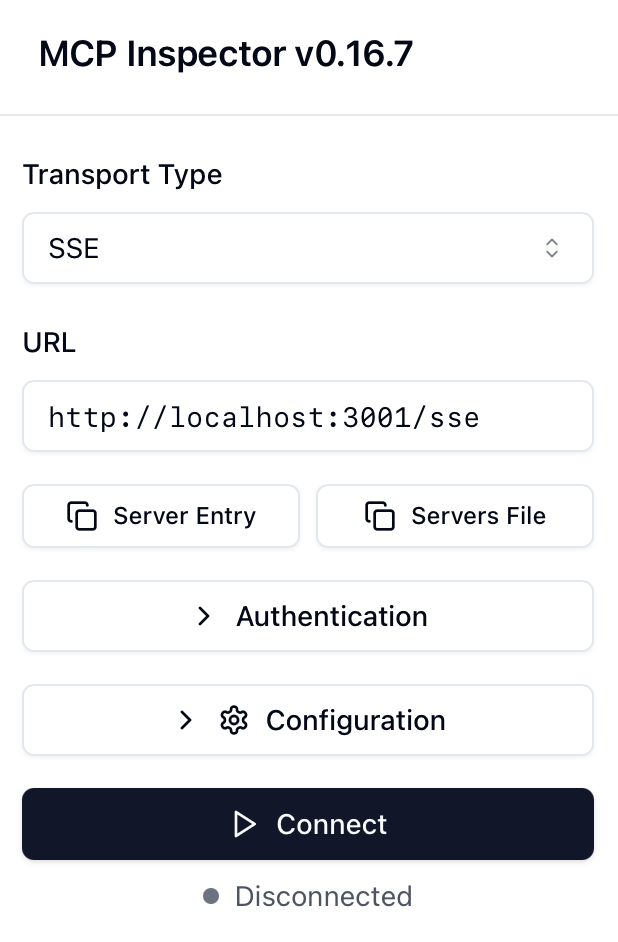
Use the MCP Inspector setup to verify the SSE endpoint and inspect the HTTP+SSE server interactively. section 7.4.2
