The hx-target attribute tells HTMX which HTML element should receive an HTTP response. It uses a CSS selector, such as #results, to identify that element. Pair it with an action attribute such as hx-get and a swap rule such as hx-swap: the action fetches HTML, hx-target finds the destination, and hx-swap decides whether to replace the element or only its contents. This lets a page update one region instead of reloading the whole page. section 12.2 section 12.7
Figure 12.1 Using HTMX attributes to change a link into an action that replaces a portion of the page
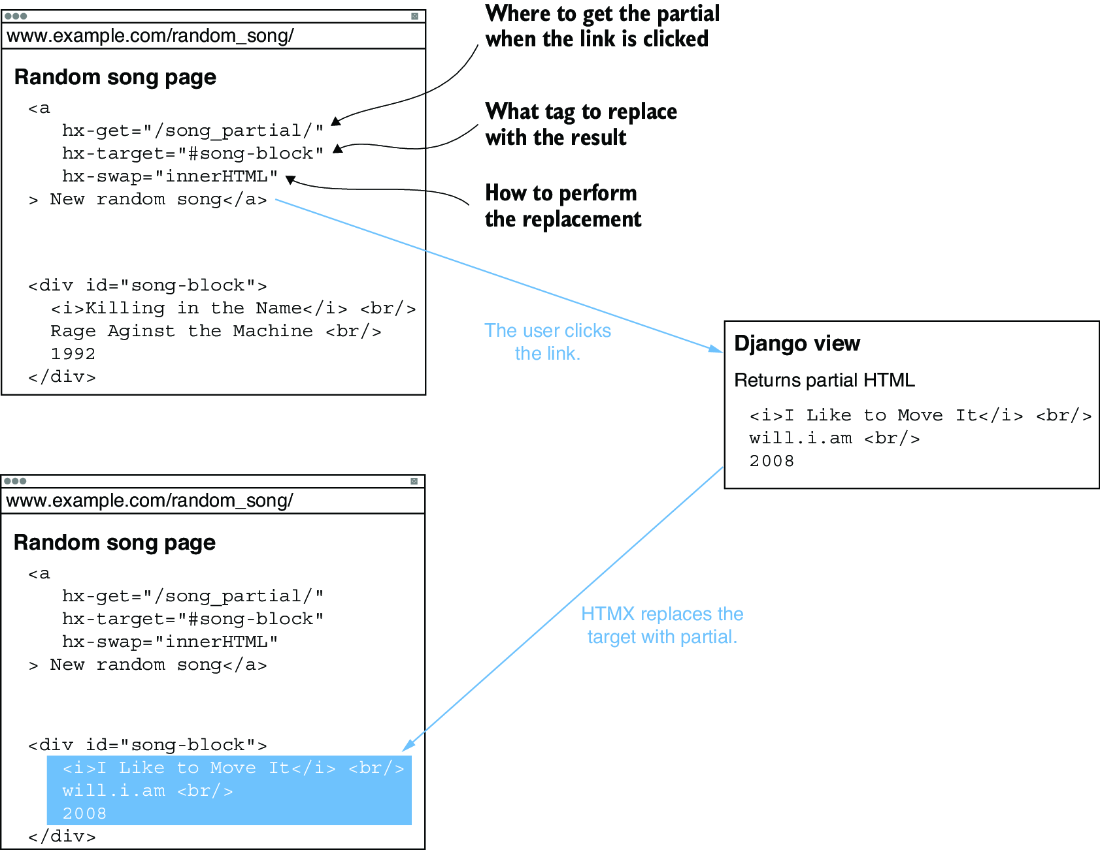
An interaction sends a request, receives an HTML partial, and replaces a selected portion of the existing page rather than the entire page. section 12.2
A target is normally placed on the element that initiates the request. The response itself is usually a partial: HTML intended for a specific region of the page. Django can return that partial for an HTMX request while continuing to return the complete page for an ordinary request. section 12.2 section 12.4
Updating search results as someone types
A musician-search input uses hx-get to call the search view after a changed keyup event and sets hx-target="#results". The selector points to a div with id="results", so the returned musician-results partial is inserted there. The initial page render includes the same partial, while an HTMX request returns only that results fragment. The search input can also use hx-push-url="true" to preserve the query in the browser URL. section 12.4 section 12.4 section 12.4
Use hx-target as part of a small request-and-update arrangement:
- Put an HTTP method attribute, such as hx-get, on an interactive element to initiate a request. section 12.2
- Set hx-target to a CSS selector for the page region that should receive the response. section 12.7
- Choose hx-swap to control the update; innerHTML replaces the target’s contents, while other swaps can replace the target element. section 12.2 section 12.4
- Return HTML appropriate for that region when the request is identified as an HTMX call. section 12.4

