hx-trigger tells HTMX when to run the request named by an attribute such as hx-get. Put it on the element involved in the interaction, then choose an event: load for page loading, keyup for typing, or revealed when an element scrolls into view. The request can return a partial HTML response while hx-target and hx-swap decide where and how that response changes the page. section 12.2 section 12.7
Common trigger patterns include:
- Use hx-trigger="load" with hx-get on a placeholder to fetch slow content after the page appears. The placeholder remains visible until the response replaces it. section 12.3
- Use hx-trigger="keyup changed delay:500ms" on a search input to request results only after a key release changes the value and typing pauses for 500 milliseconds. section 12.4
- Use hx-trigger="revealed" on a loading element to fetch another page of results when that element becomes visible during scrolling. section 12.4
Delay a promoter list until after page load
A promoter page can start with a friendly “Loading promoters...” placeholder. Give its container an hx-get URL and hx-trigger="load". Once the page loads, HTMX calls the Django view; that view renders only the promoter-list partial, which replaces the placeholder. The main page stays responsive even when the partial takes time to generate. section 12.3
Keep search requests from becoming noisy
A musician search input can send its value through hx-get on keyup, target a results container, and push the query into the URL. Adding changed prevents arrow-key releases from requesting unchanged text; delay:500ms waits for a pause, giving both the server and frantic typists a small break. section 12.4
Figure 12.1 Using HTMX attributes to change a link into an action that replaces a portion of the page
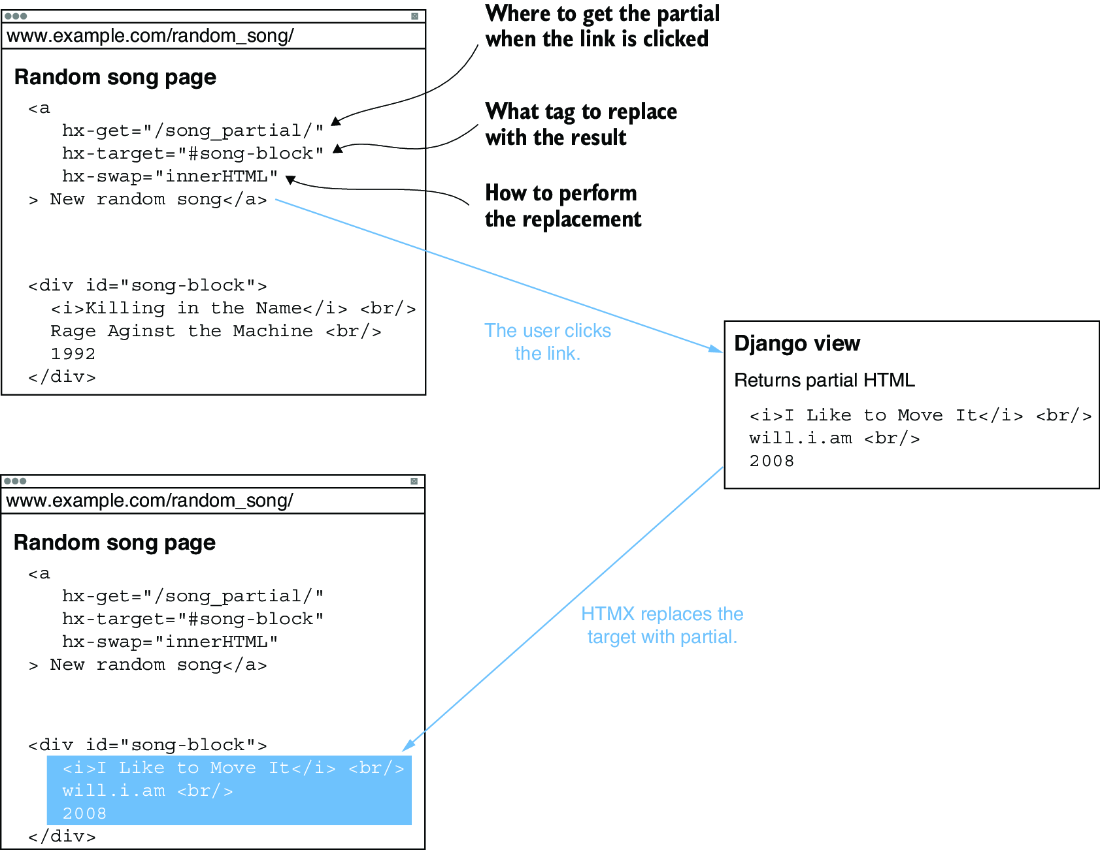
See the basic HTMX flow: an interaction invokes a request and replaces part of the page with the response. section 12.2

