Hybrid deployment combines on-premises infrastructure with Azure resources. It suits organizations that are not ready to move every service to the cloud, letting workloads and data operate across both environments. section 1.1
The practical appeal is balance: keep useful local services while using Azure for capabilities such as cloud storage, backups, and access from outside the office. It is less an all-or-nothing migration than a carefully shared workload. section 1.1 section 1.2.2
A hybrid file deployment can provide several practical benefits:
- Synchronize on-premises file servers with Azure file shares so users can work locally or in the cloud. section 1.2.2
- Use Azure-managed backup routines while reducing the need to purchase additional on-premises storage hardware. section 1.2.2
- Restrict file access to authenticated and authorized users through Entra Cloud Sync. section 1.2.2
Natasha’s synchronized file environment
Natasha installs Azure File Sync agents on the on-premises servers hosting company files. Azure keeps the local and cloud shares synchronized, provides regular backups, and supports secure access. The result is easier disaster recovery, less hardware spending, and more time for other projects. section 1.2.2
Figure 1.5 Hybrid file synchronization setup. This architecture connects an on premises environment to Azure using Entra ID for authentication and File Sync agents for keeping files synchronized between local file servers and Azure file shares. Users can access files locally or in the cloud, with changes automatically kept in sync. This setup provides built-in backups, easier disaster recovery, and secure remote access, while reducing the need for additional on premises storage hardware.
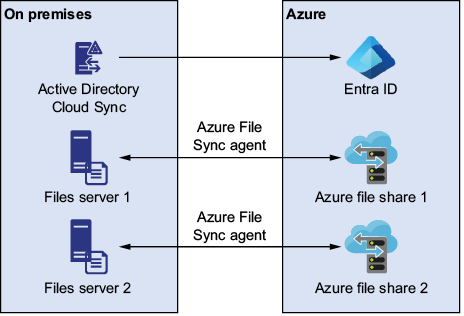
Use the hybrid file synchronization diagram to see how on-premises file servers, Azure file shares, Entra ID, and File Sync agents work together. section 1.2.2






