liveBook · Manning

I element

As explained in Design for Developers

The HTML i element marks text set apart from the surrounding text without asserting added emphasis or importance.

The HTML i element marks text set apart from surrounding content without adding emphasis or importance. Use it for an alternate voice or mood, or for idiomatic, technical, or taxonomical text. section 8.1.3

Choose the markup according to the text’s purpose:

  • Use em when italics communicate emphasis. section 8.1.3
  • Use i when the text is distinct in voice or meaning, such as technical or taxonomical language. section 8.1.3
  • Use a generic HTML element and CSS font-style: italic when italics are purely decorative. section 8.1.3
Figure 8.10 Italics aren’t just slanted; they have design elements added that make the slant feel more cursive and natural.
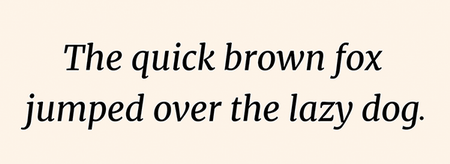
Compare true italics with simple slanted text before choosing a typographic treatment. section 8.1.3


How Design for Developers covers it

How deep it goes
Explains the semantic distinction from em and CSS styling, stopping short of implementation detail beyond the basic declaration.
Examples
Uses alternate moods or voices, idiomatic expressions, technical terms, and taxonomical text as examples.
What it assumes
Teaches the distinction between emphasis, semantic separation, and visual styling without assuming typography vocabulary.
What you can do after
Apply semantic HTML or CSS according to whether italics convey meaning or serve a purely stylistic purpose.
How it connects
Connects semantic HTML with emphasis, accessibility, italics, oblique styles, and CSS.

Also explained in

Compare how 2 books explain i element →

Related concepts

This explainer was generated by Manning's knowledge graph from the text of Design for Developers. The section links point to the parts of the book it draws on.