liveBook · Manning

IAM user

As explained in Build Python Web Apps with Streamlit

An IAM user is an AWS identity representing a person or application with long-term credentials and assigned permissions.

An IAM user is an AWS identity for a person or application. During deployment, create one with only the permissions the task requires instead of using account-level credentials. section 12.3.4

Prepare an IAM user for AWS deployment:

  • Open IAM, choose Users, and create a user. section 12.3.4
  • Attach policies directly, such as AdministratorAccess-AWSElasticBeanstalk, AmazonEC2FullAccess, and AmazonS3FullAccess. section 12.3.4
  • Create an access key, then store the access-key and secret-access-key pair safely because AWS will not show it again. section 12.3.4
Figure 12.6 Adding the appropriate permissions for an IAM user
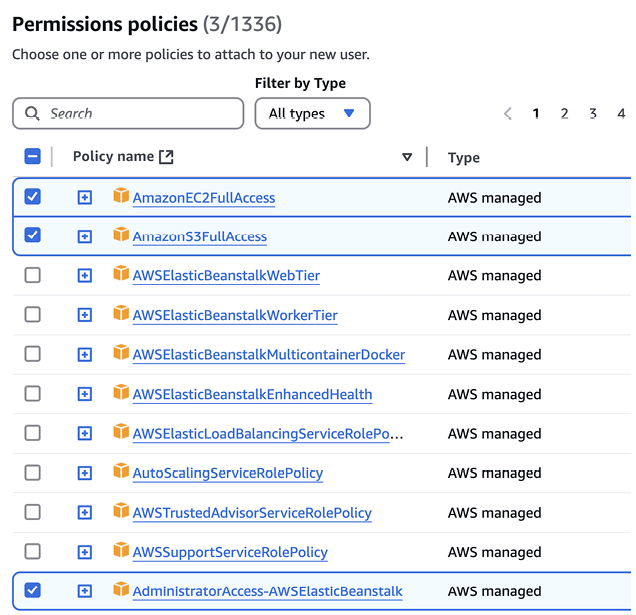
Use the permissions-console view to verify which policies are attached to the IAM user. section 12.3.4


How Build Python Web Apps with Streamlit covers it

How deep it goes
Explains creation, policy attachment, and access-key retrieval, while noting that AWS console steps may change.
Examples
Uses Elastic Beanstalk, EC2, and S3 policies as the concrete permission example.
What it assumes
Assumes an AWS account and access to the IAM dashboard.
What you can do after
Operate/configure an IAM user with deployment permissions and separately generated access keys.
How it connects
Connects IAM users with access keys, policies, IAM, Elastic Beanstalk, EC2, and S3.

Also explained in

Compare how 2 books explain IAM user →

Related concepts

This explainer was generated by Manning's knowledge graph from the text of Build Python Web Apps with Streamlit. The section links point to the parts of the book it draws on.