An icicle chart is an upside-down flame graph: a hierarchical visualization of profile data in which the stacked shape grows downward. Parca calls its flame-graph view an Icicle Graph. section 9.1.2 section 9.1.5
Use an icicle chart to:
- Navigate CPU, memory, network I/O, runtime, operating-system, and application execution profiles. section 9.1.2
- Troubleshoot concrete performance problems through continuous profiling. section 9.1.5
- Treat colors as navigation aids rather than semantic categories. section 9.1.2
Viewing an Icicle Graph in Parca
Run the supplied Docker Compose setup, configure Parca to scrape profiles from the OpenTelemetry collector, open localhost:7070, choose a profile such as Memory In-Use Bytes, and select the line graph to view the Icicle Graph. section 9.1.5
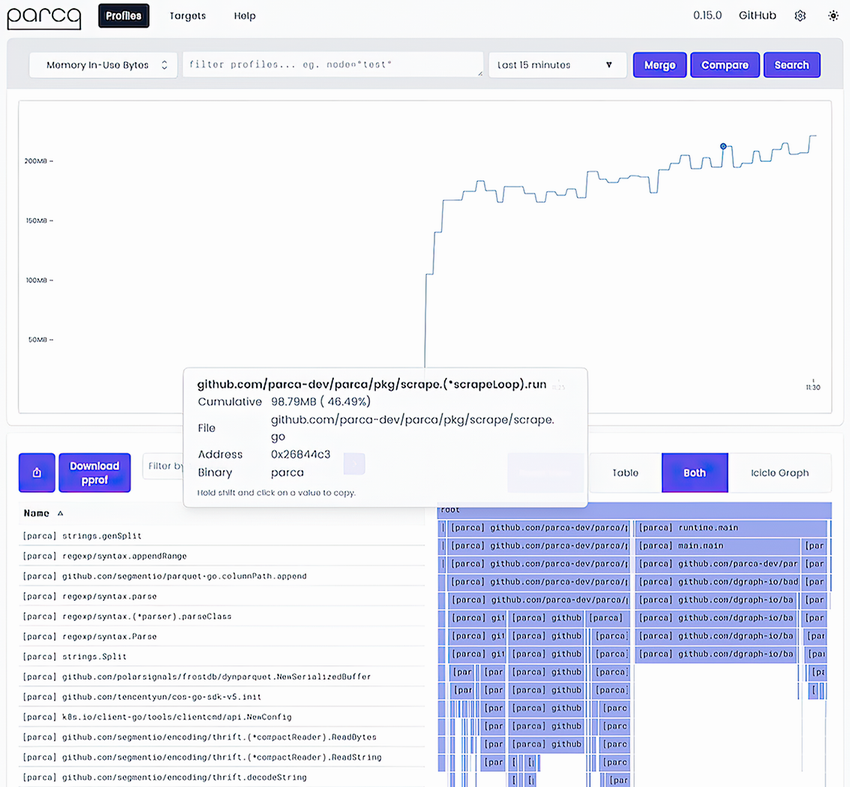
Use the Parca profiling screenshot to connect the interface and selected profile to the resulting visualization. section 9.1.5

