An icicle chart, also called a partition layer chart, visualizes hierarchical parent-child relationships through adjacency: rectangular regions are arranged in adjacent layers rather than enclosed or connected by links. section 11.0
Build one from CSV or JSON by formatting the data into a hierarchical root structure. D3's d3.partition() layout generator calculates the information needed to draw the chart, while other generators produce circle packs, treemaps, or tree charts. section 11.4
A practical D3 workflow is:
- Format the source data as a hierarchy with one root, branches, and leaf nodes. section 11.0
- Pass the root to d3.partition() from the d3-hierarchy module. section 11.4
- Use the layout information added to the dataset to append the required shapes to an SVG container. section 11.4
- Treat treemaps, circle packs, tree charts, and icicle charts as variations on the same data-preparation and layout workflow. section 11.4
A shared hierarchy pipeline
A language dataset can store each language beneath its family and branch, with speaker counts on the leaves. Convert that CSV or JSON into root, select d3.partition() for an icicle chart, and draw shapes from the calculated layout data. section 11.4 section 11.0
Figure 11.14 To create a hierarchical visualization with D3, we start by formatting CSV or JSON data into a hierarchical data structure called root. From this root, we can generate a circle pack, a treemap, a tree chart, or an icicle chart. Each chart has its own layout generator that calculates the layout and appends the information required to build it into the dataset. We then use this information to draw the shapes we need: circles, rectangles, or links.
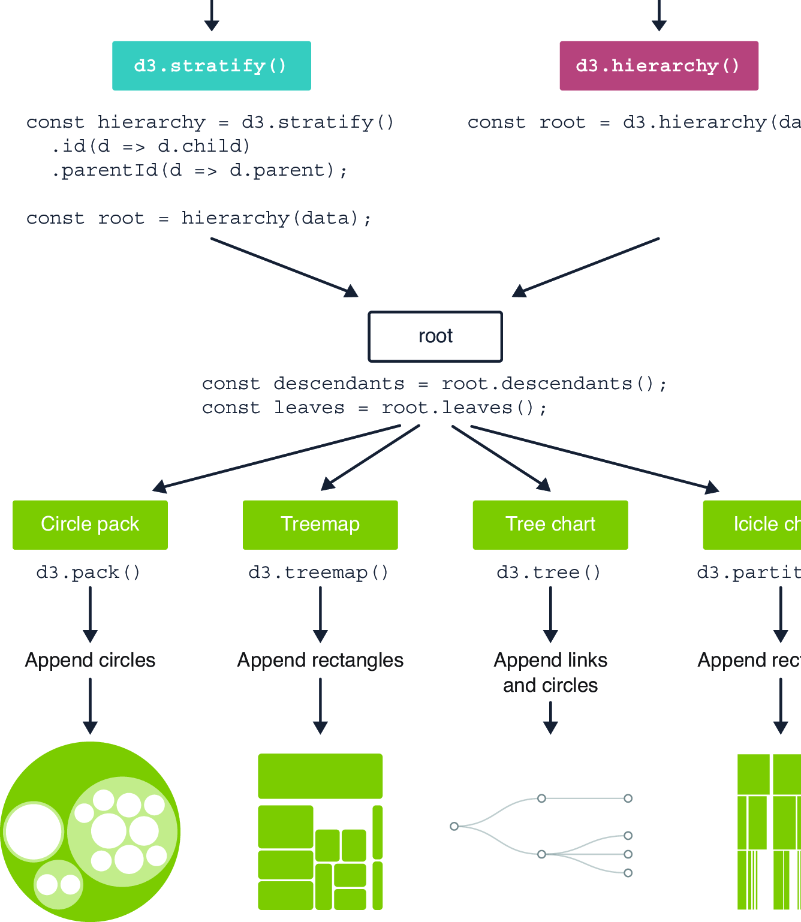
Follow the shared pipeline from hierarchical root data to a layout generator and then to SVG shapes; d3.partition() supplies the icicle-chart variant. section 11.4

