Identity protection detects suspicious identities and sign-ins by learning usual user behavior and distinguishing anomalous activity. It supports automated responses such as MFA, password changes, or blocked access, while requiring layered Azure security because compromised identities can enable lateral movement. section 1.8.1 section 2.2.5
Identity protection can detect risks including:
- Anonymous IP addresses, including Tor exit nodes and anonymizer VPNs. section 2.2.5
- Atypical travel, leaked credentials, malware-linked IP addresses, unfamiliar sign-in properties, and suspicious browsers. section 2.2.5
- Risk at both the identity level and the individual sign-in level. section 2.2.5
Configure a user risk policy in the Azure portal:
- Sign in with the Global Administrator or Security Administrator role, open Azure Active Directory, and select Security under Manage. section 2.2.6
- Open Identity Protection under Protect, choose User Risk Policy, and select the users covered by the policy. section 2.2.6
- Set the triggering threshold to High, Medium and Above, or Low and Above. section 2.2.6
- Choose Block Access, or allow access while optionally requiring a password change. section 2.2.6
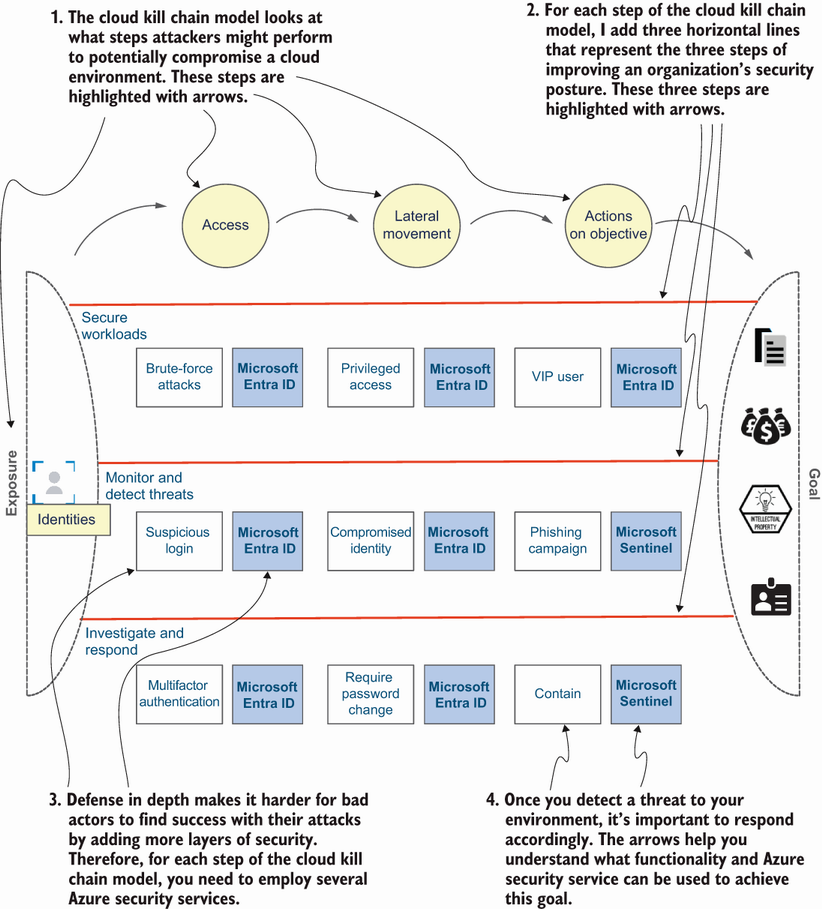
Relate identity protection to the wider attack path, including suspicious sign-ins, compromised privileged identities, lateral movement, and Microsoft Sentinel response. section 1.8.1
