Image selection chooses the image that best matches a textual description from a collection. A trained CLIP model encodes the prompt and candidate images into comparable embeddings, scores their similarity, and returns the highest-scoring image. section 8.1.2 section 8.5
A typical selection pipeline proceeds as follows:
- Encode the text prompt with CLIP’s text encoder. section 8.1.2
- Encode every candidate image with CLIP’s image encoder and retain the resulting image embeddings. section 8.1.2 section 8.4.2
- Compute similarity between the text embedding and each image embedding, then sort the candidates or select the top few. section 8.1.2
- Cache image embeddings so later prompts avoid re-encoding the dataset. section 8.4.2
Matching a classroom prompt
A match() function tokenizes “students having a class in the classroom,” creates its text embedding, compares it with stored image embeddings, and returns the highest-scoring file and caption. The selected image shows a teacher and students, while its original caption reads “a woman helps boys on a computer.” section 8.4.2
Figure 8.3 How to select an image from the Flickr 8k dataset using the trained CLIP model based on a text prompt. The text encoder in the CLIP model converts the prompt (e.g., “A dog plays on the beach,” shown at the top left) into a text embedding. Then, the image encoder processes every image in the dataset to generate N image embeddings. The similarity between the text embedding and each image embedding is then computed. Finally, the images are sorted by their similarity scores, and the one with the highest score is chosen as the match.
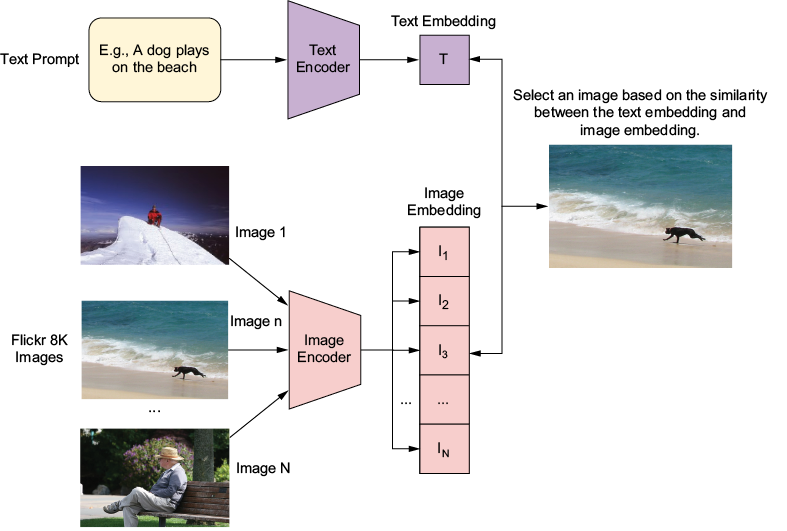
Trace the full workflow from prompt and dataset encoders through similarity scoring, sorting, and final image selection. section 8.1.2
