The Flickr 8k dataset contains roughly 8,000 photographs, including 8,091 images in one preparation, with five human-written descriptive captions per image. It supports image-captioning and image–text matching experiments. section 4.2 section 8.2
A typical preparation pipeline turns the collection into aligned training examples:
- Download the images, captions, and split metadata; read the JSON description and associate each image with its caption group. section 4.2.1
- Separate 7,000 training images from 1,000 test images, while checking that image paths and caption groups remain aligned. section 4.2.1
- Build a vocabulary from caption tokens and place examples into batches for model training. section 4.2.1 section 4.2
- Resize images to 3 × 128 × 128, tokenize captions, add <start> and <end>, and shift each caption to create decoder inputs and targets. section 4.1.1
Shifted caption example
For an image of two bears fighting, the decoder input is [<start>, two, bears, fight], while the target is [two, bears, fight, <end>]. Cross-entropy compares predicted tokens with the target while a causal mask hides future tokens. section 4.1.1
Figure 4.2 How to prepare data to train a transformer to add captions to images. We first obtain a training dataset of images paired with descriptive captions. The images are standardized to a certain size (e.g., 3 × 128 × 128) so that we can feed them to the image encoder in the transformer. The captions are tokenized, and we add <start> and <end> to the beginning and end of the caption. We omit the <end> token and use the rest of the tokens as the input sequence ([<start>, two, bears, fight]). We slide the input sequence one token to the right and use the result as the target sequence ([two, bears, fight, <end>]).
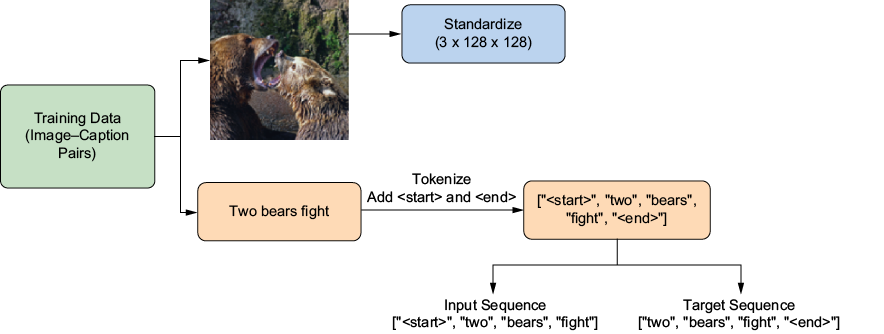
Visualizes the image–caption pair, tokenization, boundary markers, and one-token shift used to form training targets. section 4.1.1
The prepared data trains an image-to-text transformer that generates captions for test images. The same collection can train CLIP to align image and caption embeddings, enabling text-based image selection. section 4.4 section 8.0
