An image tag is a human-readable label that distinguishes versions or variants of a container image. It forms part of the image reference, such as `nginx:1.27` or `registry.local:5010/gallery/ui:2.1`. If omitted, Docker uses the `latest` tag; if the registry is omitted, Docker uses Docker Hub. section 5.1
Use tags to make image selection explicit:
- Tag application releases with major, minor, and patch levels, such as `2`, `2.1`, and `2.1.106`. section 5.4
- Choose a patch tag for repeatable deployments, a minor tag for patch updates, or a major tag for broader updates. section 5.4
- Avoid relying on unqualified or moving tags for Dockerfile base images because new build or runtime releases can break builds or applications. section 5.4
- Include platform information when separate images target different systems, such as `2e-linux-arm64` and `2e-linux-amd64`. section 12.1
Build and retag an image
Build an image with a tag, then add release-oriented aliases: `docker image build --tag web-ping .`; `docker image tag image-gallery registry.local:5010/gallery/ui:2.1.106`; `docker image tag image-gallery registry.local:5010/gallery/ui:2.1`. The first command stores the tagged image locally; the second and third names can represent a fixed patch release and a moving minor-release alias. section 3.3 section 5.4
Figure 5.1 Anatomy of a Docker image reference
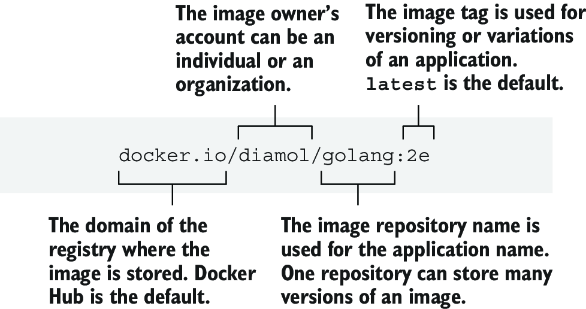
Use the image-reference anatomy to locate the registry, repository, image name, and tag in a complete reference. section 5.1





