Image-to-image generation (img2img) makes a new image by using an existing image as a guide. In Stable Diffusion, it can turn ordinary upscaling into a creative pass: preserve the broad composition, add detail, alter style, or deliberately push the result somewhere new. section 7.3 section 7.5
For a quick high-resolution workflow, generate a low-resolution image in txt2img, send it to the img2img tab, choose a resize mode, set a resize factor, and generate again. Unlike a simple pixel enlargement, this runs diffusion with the original image as guidance, so the output may gain details or change in visible ways. section 7.3 section 7.3.1
The main controls decide how closely the new image follows its starting point:
- Resize mode controls whether to resize directly, crop for a new aspect ratio, fill added space, or use latent resizing. section 7.3
- Denoising strength balances fidelity against transformation. Lowering it can keep a changed-checkpoint result closer to the original; higher values can produce a stronger reworking. section 7.3.2
- Seed creates a different variation from the same base image. section 7.3.1
- Checkpoint can radically change the visual style, such as shifting an image toward an anime look. section 7.3.2
Turn anime ramen more realistic
Create anime-style ramen with the CoffeeMix checkpoint, send it to img2img, switch to Deliberate, choose a resize ratio, then tune the prompt, sampling settings, and denoising strength. Generate many candidates and keep the best: repeatable variation beats manually rebuilding the same chain every time. section 8.1 section 8.1.1
Img2img can feed itself. Send an img2img result back through the process for further stylization, but reset resize to 1 before another pass; otherwise a 4× resize followed by another 4× resize becomes a 16× resolution jump. Repeated passes can create a comic-like result, then eventually get weird. section 7.3.3
Figure 7.14 Configuration options for img2img.
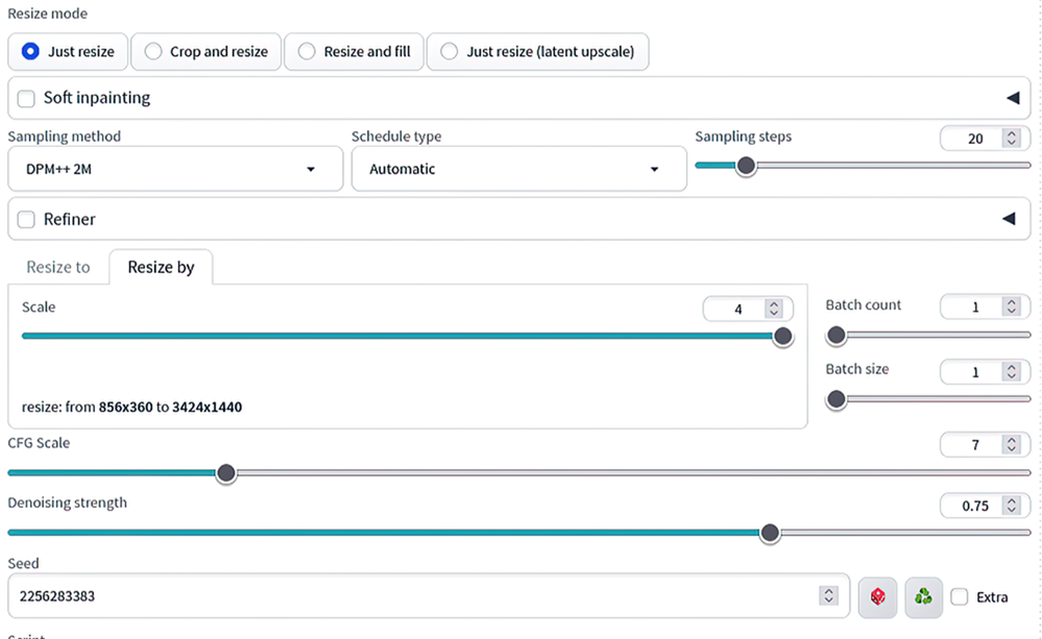
Use the img2img configuration view to locate the input image, prompt, resize settings, and generation controls before experimenting with variations. section 7.3
This flexibility has a cost: manually switching between txt2img and img2img, swapping checkpoints, and restoring settings becomes tedious when exploring many candidates. A node-based ComfyUI workflow makes developed pipelines easier to reproduce and automate. section 7.4 section 8.1.1
