AUTOMATIC1111’s Stable Diffusion Web UI, usually called A1111, is an open-source graphical interface for creating and customizing Stable Diffusion images. It replaces a command-line-first experience with a local, browser-based workspace for prompting, changing generation settings, reviewing results, and trying again until the wonderful outweighs the strange. section 1.1 section 1.0
Start locally, open the interface in a browser, and use the txt2img controls to turn a prompt into a batch of images. Prompt text, batch count and size, width, height, and seed give an immediate set of levers: generate several candidates, keep the promising ones, then revise the request or settings. section 1.1 section 2.1.1 section 1.0
A practical A1111 loop looks like this:
- Write a direct prompt, generate multiple images, and judge the visible output rather than expecting the first attempt to read your mind. section 1.0
- Increase emphasis on an important prompt term with parentheses, nested parentheses, or a weight such as `(worm:1.2)` when the model is ignoring it. section 2.2.2
- Adjust CFG Scale and Sampling Steps while experimenting with the generated images. section 2.3
- Use the saved image folder and its filenames to find outputs and recover their seeds. section 2.1.2
- Drop a saved image into PNG Info and send its recovered settings back to txt2img to continue from the same setup. section 2.4
From rough sandworm to reusable setup
Generate six batches of two images from `sandworm` at 680×520 with a random seed. Refine the request to `scene from a scifi movie, a sandworm with a large open mouth`; if the creature keeps reading as a dinosaur, emphasize `worm`. Once a favorite emerges, PNG Info can restore its settings for another pass instead of turning yesterday’s lucky image into a tiny archaeological dig. section 2.1.1 section 2.1.2 section 2.2.2 section 2.4
Figure 2.22 Using PNG Info to be able to recreate this image.
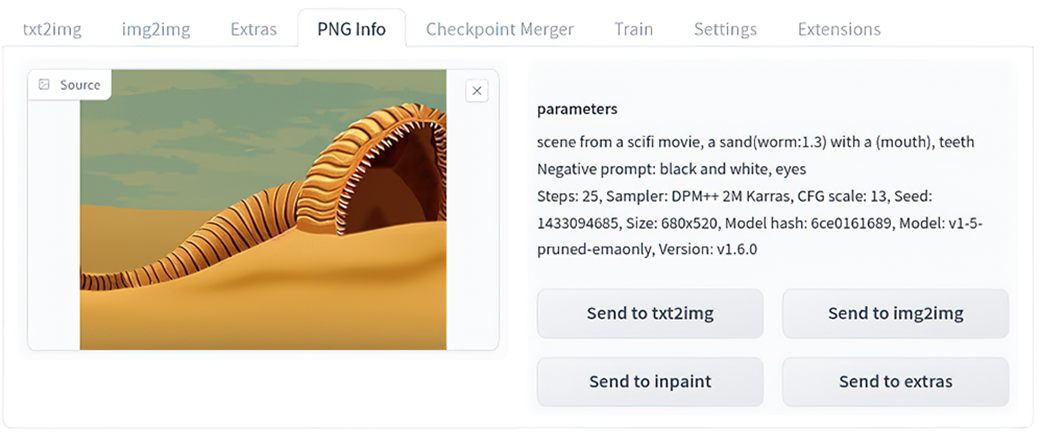
PNG Info makes a generated image a reusable recipe: inspect its embedded settings, then load them back into txt2img. section 2.4
A1111 is well suited to exploratory work and quick projects, but repeated multi-stage workflows can become click-heavy. For workflows involving repeated txt2img, img2img, checkpoint changes, resizing, and denoising adjustments, a workflow-oriented interface such as ComfyUI is positioned as easier to reproduce at scale. section 1.1 section 8.1.1
