Checkpoint merging combines two or more existing Stable Diffusion checkpoints into a new checkpoint. Think paint mixing, except the pigments are model weights: a weighted average can preserve more of one model’s qualities while borrowing some of another’s. It creates new model variants quickly, with low VRAM demands compared with training a new model. section 14.0 section 14.5
The useful question is not “which model wins?” but “what balance produces the image I want?” A realistic checkpoint and an anime-styled checkpoint can yield a middle ground such as an illustrated or painterly look. Change the ratio, generate again, and compare the results; fast iteration is the whole trick. section 14.1 section 14.2 section 14.2.2
For a quick Stable Diffusion 1.5 merge in A1111:
- Open the Checkpoint Merger tab and select a primary model A and secondary model B. section 14.2.1
- Set the Multiplier carefully: it assigns weight to model B. A value of 0.2 gives model A 80% weight and model B 20%. section 14.2.1
- Name the output with its proportions, such as coffee_80_deliberate_20, so experiments remain recognizable. section 14.2.1
- Press Merge; A1111 saves the new checkpoint in the checkpoints directory, ready to load for generation. section 14.2.1 section 14.2.2
Finding a painterly middle ground
Merge CoffeeMix as model A with Deliberate v6 as model B at 80/20. Generate “Snowy mountainside covered in a forest of evergreen trees.” The result leans toward CoffeeMix while combining properties of both originals. Try several ratios rather than treating 80/20 as sacred; subtle shifts can matter. section 14.2 section 14.2.2
Figure 14.13 Visualizing a range of results by combining CoffeeMix with Deliberate at different ratios.
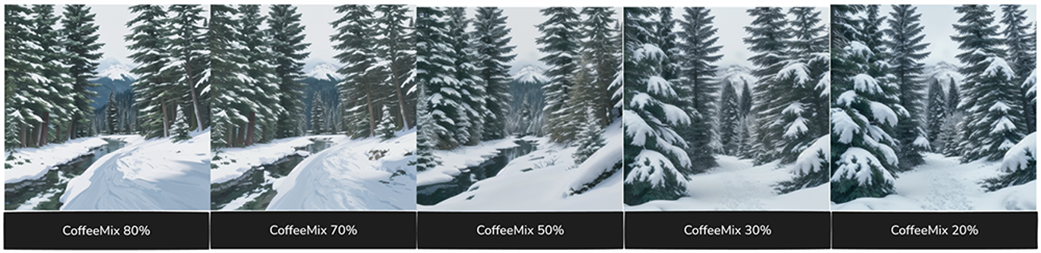
Compare the same two checkpoints across several ratios to see why weight choices are creative controls, not merely settings to fill in. section 14.2.2
A1111 is the fast path for SD 1.5, but its standard setup does not merge SDXL checkpoints. For SDXL or repeated comparison work, ComfyUI trades a longer initial setup for a workflow that can generate previews for model A, model B, and the merge in one run. It can also postpone saving a roughly 6 GB merged file until a result is worth keeping. section 14.3 section 14.3.1
A practical ComfyUI merge workflow:
- Load checkpoints A and B, then share prompt encoding, negative-prompt encoding, and an empty latent across three generation paths. section 14.3.1
- Use ModelMergeSimple for the merge; use Save Checkpoint only when the merged model deserves disk space. section 14.3.1
- Preview the originals and merged output together, adjust the ratio or prompt, and mute Save Checkpoint while experimenting. section 14.3.1 section 14.5
Figure 14.15 We are generating 3 images with each run of the workflow.
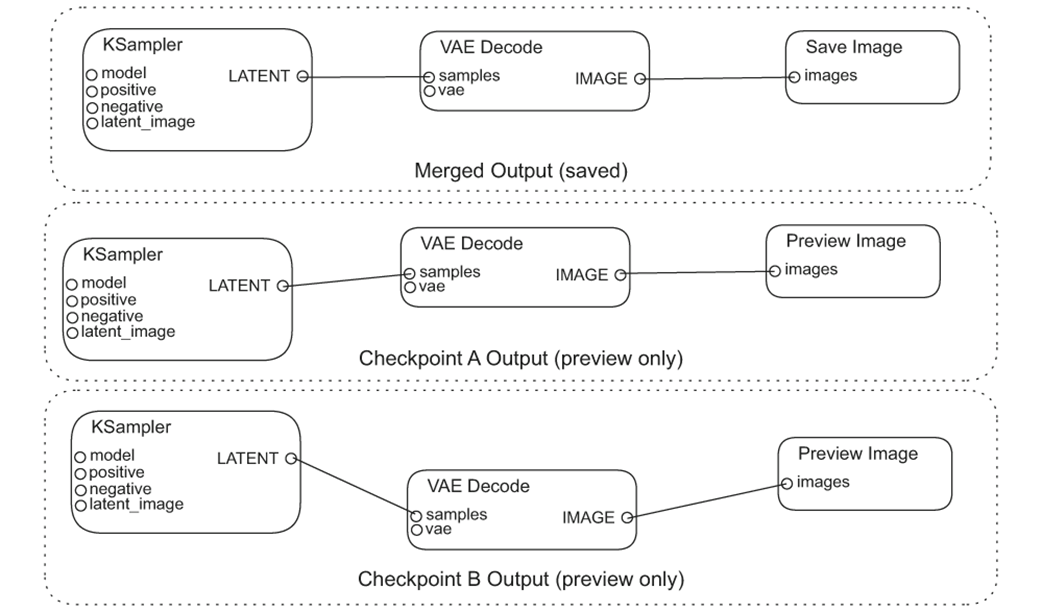
The three-output layout makes comparison immediate: inspect model A, model B, and the merged result from the same run. section 14.3.1
Checkpoint merging is not a substitute for carefully collecting data and training when that work is needed. Its advantage is different: it lets you reshape the model you are using in seconds, explore combinations cheaply, and save only the mixtures that earn a permanent checkpoint. section 14.2.2 section 14.3.2
