ComfyUI is a visual workflow builder for Stable Diffusion: instead of revisiting tabs and settings for every generation, connect the pieces once and run the whole pipeline again with a click. Setup takes more effort, but it turns a repeatable image process from a pile of manual chores into a reusable graph. section 8.0 section 8.1.1
Figure 8.2 ComfyUI allows us to build workflows by connecting components.
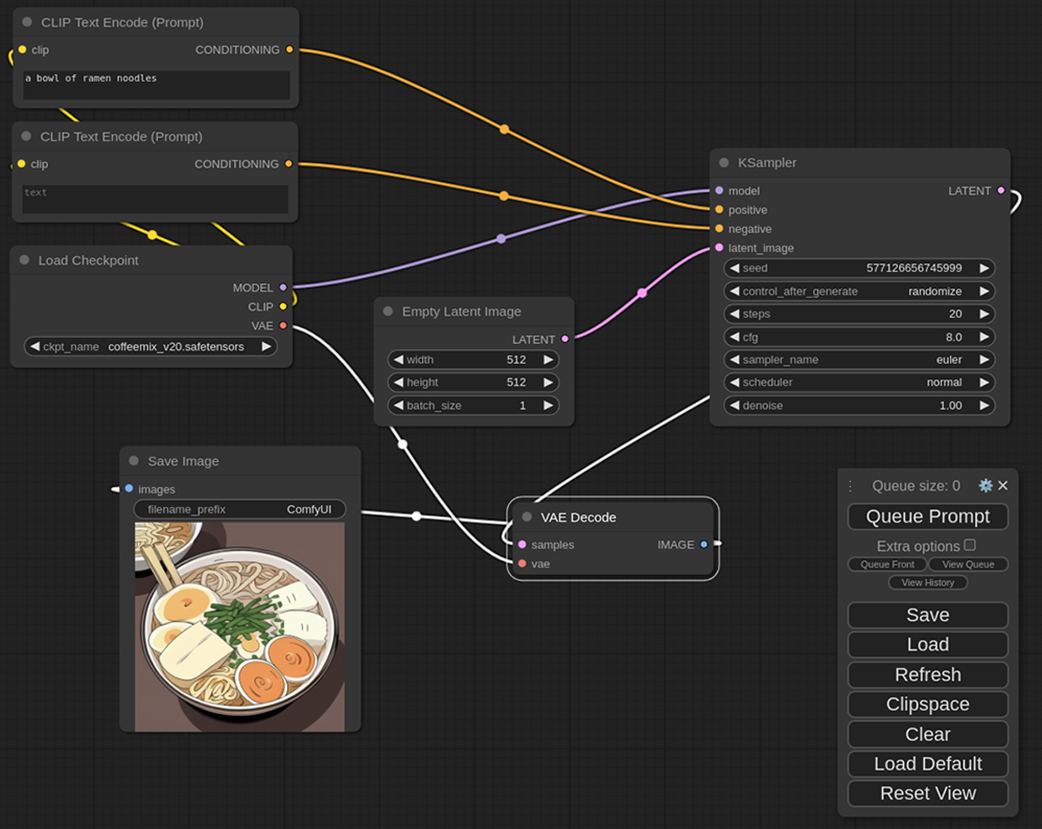
A workflow mirrors a diffusion pipeline as connected nodes. Each node performs one job, and the links show where its outputs go next. section 8.1.2
Start locally: install ComfyUI, run `python main.py` from its directory, then open the local browser address it prints. Clear any starter graph when learning so every node has an obvious reason to be there. The interface can look like someone spilled spaghetti on a circuit board at first; build one connection at a time. section 8.2 section 8.1.2
Build and reason about a workflow with a few wiring rules:
- Add a Load Checkpoint node, choose a checkpoint from `models/checkpoints`, and use its MODEL output as the model input for KSampler. section 8.2.2
- Connect every required input before running. A node may leave some outputs unused, and one output may feed multiple inputs. section 8.5
- Follow connector colors and drag from an empty socket to see compatible node choices; invalid connections are blocked. section 8.2.2
- Save workflows for reuse. Generated images also retain the workflow, making a successful result a useful starting artifact rather than a mystery prize. section 8.5
Anime ramen to a more realistic bowl
A two-stage img2img graph can generate anime-style ramen with CoffeeMix v2.0, then pass it through Deliberate v5.0 for a more realistic interpretation. Keep separate positive and negative prompts for the stages, edit them, and use Queue Prompt to rerun or queue additional generations without manually changing models and tabs each time. section 8.1 section 8.4.2
The payoff grows with complexity. Add another img2img pass or model by connecting nodes once, then repeat the assembled process. The same flexibility supports an SDXL checkpoint-merging workflow that can generate comparison images before saving a large merged checkpoint. Existing workflows are also practical blueprints for discovering new graph patterns. section 8.4.2 section 14.3 section 8.5
