An in-memory database keeps data in memory so an application can read and write it with very little latency. It can serve as a fast layer beside a relational database: the database remains the primary store, while the in-memory layer handles frequently accessed or transient data. section 11.0 section 11.1.1
Game leaderboard
A game can keep player scores in a Redis sorted set, which orders entries by score as they are inserted. Reading the leaderboard from Redis avoids repeatedly querying and sorting millions of scores in the relational database. Player profiles and other heavily read data can be cached there too. section 11.0
For a managed AWS deployment, Amazon ElastiCache runs Redis or Memcached clusters. A minimal single-node ElastiCache cluster in CloudFormation uses AWS::ElastiCache::CacheCluster with an engine, node type, node count, subnet group, and security group. Its nodes have private IP addresses, so testing requires a client such as an EC2 instance in the same VPC. section 11.1.1 section 11.7
Forum caching
Discourse uses PostgreSQL as its main data store and Redis for cached and transient data. A CloudFormation deployment brings together the VPC, cache cluster, database instance, EC2 instance, and their network settings. section 11.4
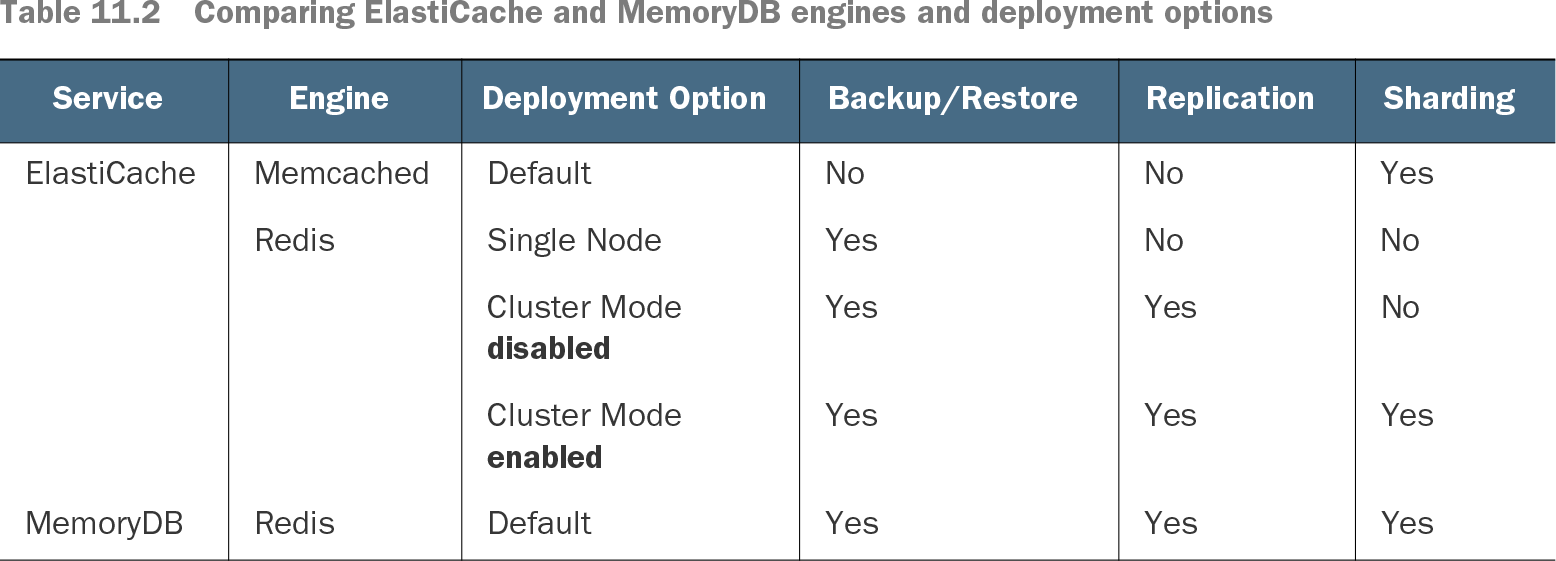
Choose a deployment by asking whether you need backup and restore, replication for availability, or sharding for more memory or throughput. Cached items may expire or be refreshed with write-through updates; a full cache may evict items. Memcached suits replaceable data but loses a failed node’s contents and cannot back them up. MemoryDB offers a Redis-compatible alternative with strong persistence guarantees. section 11.2 section 11.2.1 section 11.7
Table 11.2 Comparing ElastiCache and MemoryDB engines and deployment options (view table figure)
Compare ElastiCache and MemoryDB deployment options by engine, backup and restore, replication, and sharding. section 11.2