Suppose a website produces events every day. Fetching its entire event history and recalculating every statistic on each run wastes work. Incremental processing gives each DAG run one time-based partition: fetch that interval’s events, calculate its statistics, and add the results to the accumulated dataset. section 3.4.1 section 12.3.2
Use a data-interval timetable when tasks need explicit boundaries. With a daily CronDataIntervalTimetable, Airflow runs the DAG at the end of each interval, when that day’s data can be available. The execution context supplies data_interval_start and data_interval_end; template those values into the request rather than hard-coding dates. section 3.4.2
One day of events
Set schedule=CronDataIntervalTimetable("@daily", timezone="UTC"). For the January 1 interval, request /events/range with start_date=2024-01-01 and end_date=2024-01-02. The endpoint includes the start and excludes the end. In the BashOperator request, use {{ data_interval_start | ds }} and {{ data_interval_end | ds }} for those dates. Save the events to a date-named JSON file; have a downstream PythonOperator read that file and write a date-named statistics CSV. The next run uses the next interval without overwriting January 1’s files. section 3.4.2 section 3.4.1
Figure 3.6 Incremental processing in interval-based scheduling windows versus windows derived from trigger schedules. For incremental (data) processing, time is typically divided into discrete time intervals that are processed as soon as the corresponding interval has passed. The interval-based scheduling approach explicitly schedules tasks to run for each interval while providing exact information to each task concerning the start and end of the interval. By contrast, trigger–based scheduling approaches execute tasks only at given times, leaving it up to each task itself to determine the incremental interval for which the task is executing.
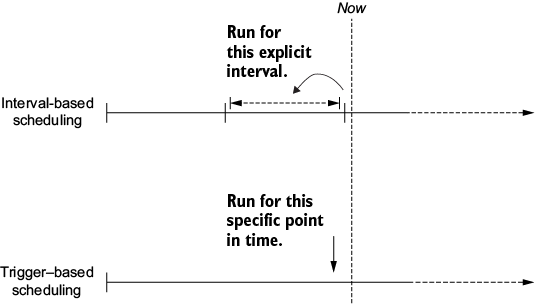
Compare explicit data intervals with trigger schedules: the former give each run its processing boundaries, while the latter leave interval selection to the tasks. section 3.4.2
Operational choices matter:
- Partitioning reduces the data processed per run and preserves a growing history of results. For the events example, local daily files can extend beyond the API’s seven-day history. section 3.4.1
- Restart a failed partition rather than recomputing the whole dataset. Design tasks to be idempotent and deterministic so reruns and backfills remain reproducible. section 12.3.2 section 12.5
- Use backfilling to run past intervals when historical data must be loaded or reprocessed. If a later analysis needs the whole dataset, first filter or aggregate incrementally, then analyze the smaller result. section 1.2.5 section 12.3.2
