An instance model turns a graph schema into a small, concrete graph containing actual data. Use one when a schema looks plausible on paper but needs to be tested against real entities, relationships, and properties. The schema sets the rules; the instance model shows what following those rules produces. section 8.2.3 section 8.2.2
Build an instance model in a practical sequence:
- Identify the schema and select a representative subset of data. section 8.2.3
- Create a node for each selected entity, with its label, unique identifier, and properties. section 8.2.3
- Create edges for the relationships, including labels, properties, directions, and multiplicities; check every element against schema constraints. section 8.2.3
- Visualize the graph, then load it into a graph database or processing system so queries can test it. section 8.2.3
Recruitment data
A recruitment instance can contain candidate nodes populated with actual data rather than placeholders. Tests can check that each candidate has non-null industry and job-type attributes, every candidate identifier is unique, and candidate-to-candidate connections use the Knows edge type. The resulting graph tests whether the schema captures the relationships the application needs. section 8.2.3 section 8.2.4
Figure 8.6 Example of an instance model with nodes filled with actual data from the recruiter example. Real instance models may have much more data.
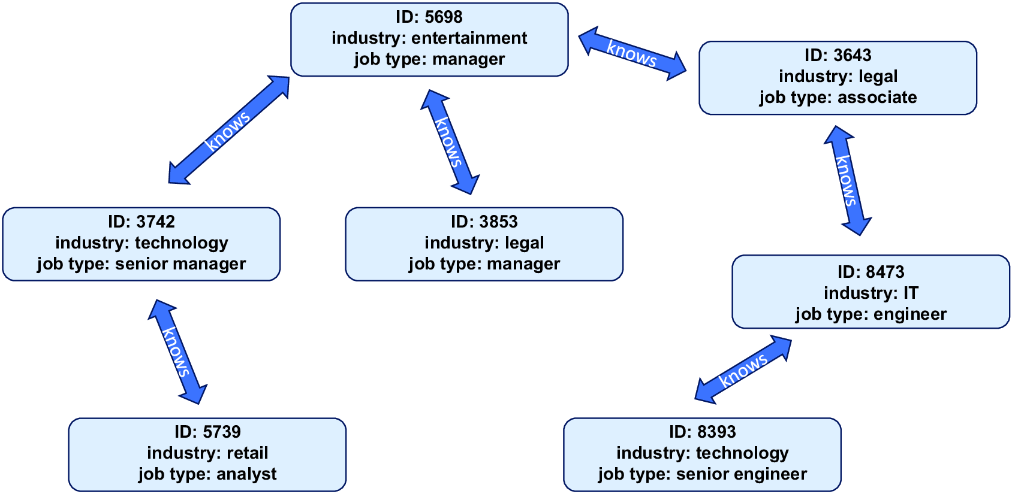
Compare the populated candidate nodes and edges with the schema they instantiate; an operational instance may contain much more data. section 8.2.3
Treat the first instance as a test, not a finished design. Run integrity queries, inspect the results, adjust the schema or instance, and retest. Cypher or SPARQL can query a graph database; Python with NetworkX is another option for a graph processing system. Check fit with the chosen system as well as data rules: poor modeling choices can create costly workarounds as the graph grows. section 8.2.4 section 8.2
