Interaction design shapes how people use a digital visualization: what they can control, how the display responds, and whether those possibilities are understandable. Its aim is simple: help people achieve their objectives without making them guess what to do next. Interactivity should clarify and extend a visualization, not hide crucial information behind tooltips or force unnecessary toggling and filtering. section 7.0 section 7.1
The Norman-door test
A confusing door is a useful warning sign. If people push when they should pull—or feel uncertain about how to open it—the design has failed to communicate its operation. Interfaces can create the same problem when controls look inert, labels contradict behavior, or identical-looking elements work differently. A control should make its likely action apparent before someone has to experiment with it. section 7.1 section 7.1.1
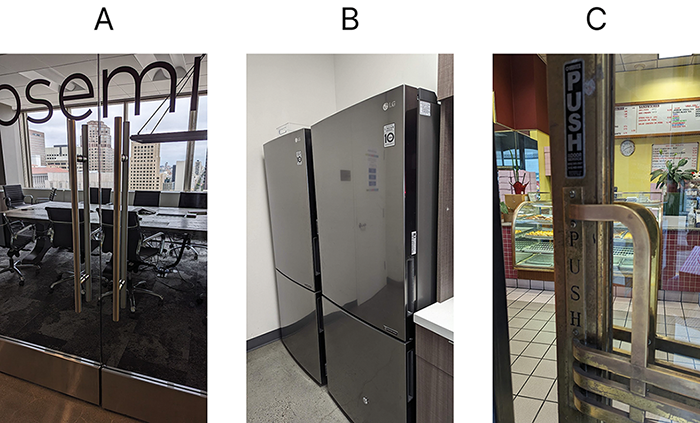
Compare several everyday failures of discoverability: the physical form of each door gives insufficient or misleading clues about how it opens. section 7.1
Make interactive elements discoverable:
- Use familiar controls—such as buttons, check boxes, and toggle switches—when their purpose is obvious from their appearance. section 7.1.1
- Match an element’s appearance to its behavior. If something should be clicked like a button, make it look like a button. section 7.1.1
- Respect learned conventions. Underlined text commonly signals a hyperlink, so avoid using it as ordinary decoration when it does not link anywhere. section 7.1.1
- Treat affordances as usable clues: a trait of an object can suggest how it can or should be used, as a knob suggests turning. section 7.1.1
Beauty helps, but it does not replace usability. The aesthetic-usability effect describes how an appealing design can be perceived as easier to use, making people more willing to try it and more forgiving of problems. For interactive details such as animation, favor fast and unobtrusive behavior; an animation that makes someone wait quickly stops feeling satisfying. Visual tastes and interface conventions also change, so polished interactions need periodic reconsideration rather than a permanent style rule. section 7.1.5 section 7.1.5

