interface vlan vlan-id is a Cisco IOS command that enters configuration mode for the switch virtual interface (SVI) associated with a specified VLAN. The VLAN ID matters: it identifies the SVI’s VLAN, unlike a router subinterface identifier. section 12.4.2 section 12.5
Use the command as part of multilayer-switch inter-VLAN routing:
- Enable IP routing with ip routing; otherwise the switch cannot forward packets between VLANs or subnets. section 12.4.2
- Enter interface vlan vlan-id, then configure the SVI’s IP address as you would configure a router interface. section 12.4.2
- Check show ip interface brief and confirm the SVI reaches an up/up state; the associated VLAN must exist. section 12.4.2
- Use no shutdown when a switch administratively disables an SVI by default. section 12.4.2
Configuring three SVIs
SW1(config)# ip routing SW1(config)# interface vlan 10 SW1(config-if)# ip address 172.16.1.1 255.255.255.192 SW1(config-if)# interface vlan 20 SW1(config-if)# ip address 172.16.1.65 255.255.255.192 SW1(config-if)# interface vlan 30 SW1(config-if)# ip address 172.16.1.129 255.255.255.192 These SVIs give SW1 connected and local routes for VLANs 10, 20, and 30, allowing internal inter-VLAN routing without an external router. section 12.4.2
Figure 12.11 SW1, a multilayer switch, routes a packet from PC1 to PC5. SW1 has three SVIs: VLAN 10 (172.16.1.1), VLAN 20 (172.16.1.65), and VLAN 30 (172.16.1.129), allowing SW1 to route packets internally, without relying on an external router.
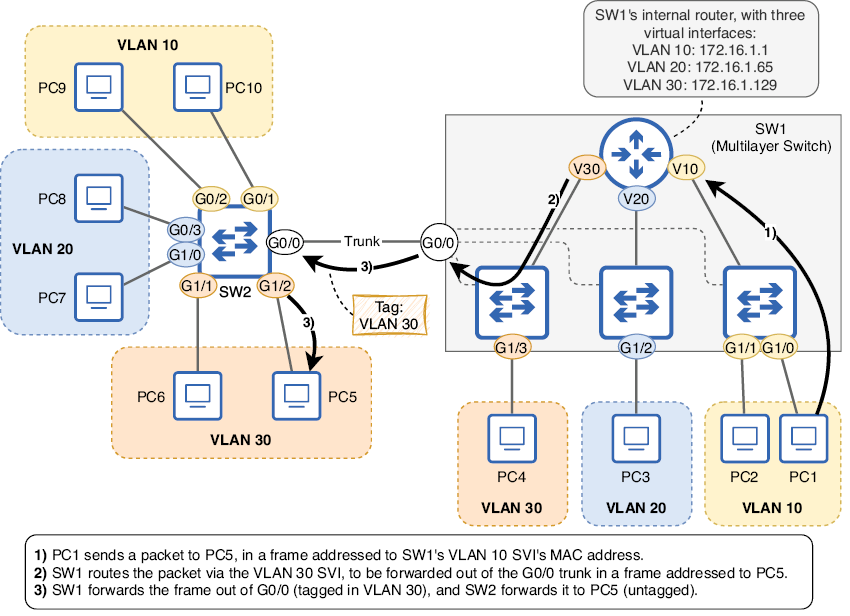
Visualizes how a multilayer switch uses VLAN 10, VLAN 20, and VLAN 30 SVIs to route traffic internally. section 12.4.2
