DHCP snooping is a Cisco IOS switch security feature that inspects DHCP messages to block rogue DHCP servers and DHCP poisoning attacks. Enable it globally, then activate it on each VLAN using DHCP. section 13.3 section 13.2
Configure and apply the feature as follows:
- Enter ip dhcp snooping in global configuration mode; the feature is disabled by default. section 13.2
- Activate inspection with ip dhcp snooping vlan vlans, such as ip dhcp snooping vlan 1 or ip dhcp snooping vlan 1-4094. section 13.2
- Keep ports toward end hosts untrusted, and configure ports toward DHCP servers as trusted with ip dhcp snooping trust. section 13.3
- Discard server messages received on untrusted ports; validate client messages and record successful leases in the DHCP snooping binding table. section 13.3
Enable and verify VLAN 1
SW2(config)# ip dhcp snooping SW2(config)# ip dhcp snooping vlan 1 SW2(config)# do show ip dhcp snooping Switch DHCP snooping is enabled DHCP snooping is configured on following VLANs: 1 DHCP snooping is operational on following VLANs: 1 section 13.2
Figure 13.2 Configuring DHCP Snooping on Cisco switches. Ports leading toward the DHCP Server are trusted, and ports leading toward users are untrusted. Only SW1’s configurations are shown, but the same commands should be configured on SW2.
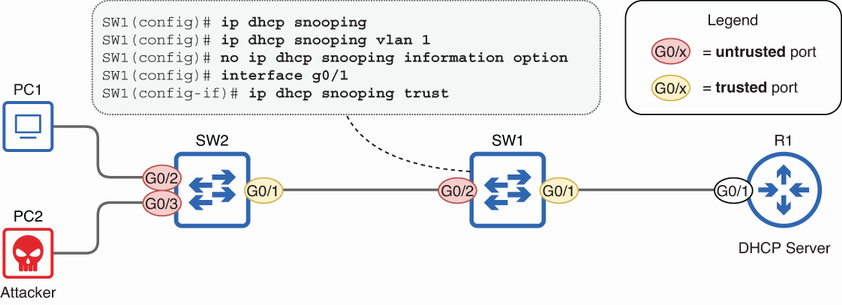
Use the topology to distinguish trusted ports leading toward the DHCP server from untrusted ports leading toward users. section 13.2
