DHCP snooping is a Layer 2 switch security feature that inspects DHCP messages and filters attacks such as rogue-server poisoning and DHCP exhaustion. It affects DHCP messages only; non-DHCP traffic is unaffected. section 13.0 section 13.3
Enable the feature globally, then activate it on every VLAN containing DHCP clients. It is disabled by default, and a VLAN can be configured but inactive when the VLAN itself is disabled. section 13.2
Apply the trusted-port model as follows:
- Keep ports toward end hosts untrusted; all ports are untrusted by default. section 13.2.1
- Configure ports toward the DHCP server or upstream DHCP path as trusted with ip dhcp snooping trust. section 13.2.1
- Allow all DHCP messages received on trusted ports, while filtering DHCP messages received on untrusted ports. section 13.2.1
- Discard server messages such as OFFER, ACK, and NAK on untrusted ports; process client messages such as DISCOVER, REQUEST, DECLINE, and RELEASE. section 13.3 section 13.2.1
- Check that the Ethernet source MAC address matches the DHCP chaddr in DISCOVER and REQUEST messages; discard mismatches. section 13.3
- Create a DHCP snooping binding-table entry after a client successfully leases an address. section 13.3
Configure and verify VLAN 1
SW2(config)# ip dhcp snooping SW2(config)# ip dhcp snooping vlan 1 SW2(config)# interface g0/1 SW2(config-if)# ip dhcp snooping trust SW2(config-if)# do show ip dhcp snooping Switch DHCP snooping is enabled DHCP snooping is configured on following VLANs: 1 DHCP snooping is operational on following VLANs: 1 The first command enables snooping, the second activates it on VLAN 1, and the interface command trusts the server-facing port. Use show ip dhcp snooping to distinguish configured from operational VLANs. section 13.2 section 13.2.1
Figure 13.2 Configuring DHCP Snooping on Cisco switches. Ports leading toward the DHCP Server are trusted, and ports leading toward users are untrusted. Only SW1’s configurations are shown, but the same commands should be configured on SW2.
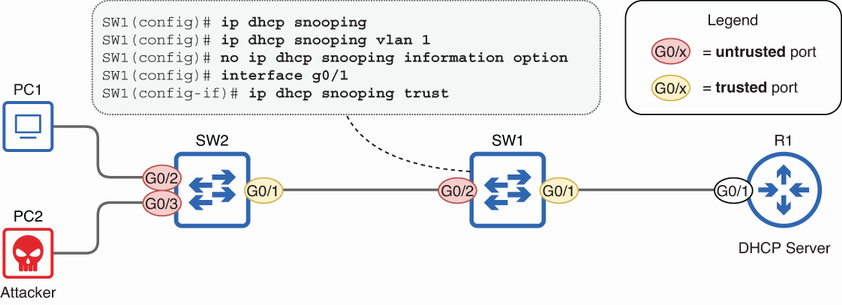
Use the topology figure to identify which switch ports lead toward the DHCP server and should be trusted, versus which lead toward users and should remain untrusted. section 13.2
Inspect learned clients with show ip dhcp snooping binding. The table maps MAC addresses to leased IP addresses, lease times, VLANs, and interfaces. Dynamic ARP Inspection uses this table to inspect ARP traffic, linking the two security features. section 13.2.1 section 14.2
