ip helper-address configures a Cisco IOS interface to relay selected client broadcasts, especially DHCP DISCOVER and REQUEST messages, to a remote server as unicast traffic. Configure it on the interface connected to the clients, because routers do not forward broadcasts between subnets. section 4.2 section 4.4
Remember these configuration and verification points:
- Enter interface configuration mode and apply ip helper-address server-ip. section 4.2
- Use show ip interface interface-name and look for the configured Helper address. section 4.4
- The helper-address concept can support protocols beyond DHCP, although DHCP relay is its primary use here. section 4.2
Configure and verify a DHCP relay
R1(config)# interface g0/0 R1(config-if)# ip helper-address 10.2.2.10 R1(config-if)# do show ip interface g0/0 ... Helper address is 10.2.2.10 R1 relays client broadcasts received on G0/0 toward the DHCP server at 10.2.2.10. section 4.2
Figure 4.6 The ip helper-address command makes R1 a DHCP relay agent, forwarding clients’ DHCP messages to the specified server.
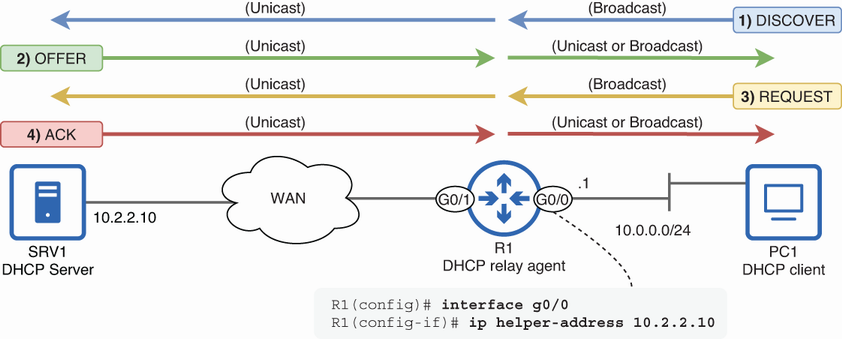
Use the topology figure to trace the client, relay interface, and centralized DHCP server. section 4.2
R1(config)# interface g0/0
R1(config-if)# ip helper-address 10.2.2.10       #1
R1(config-if)# do show ip interface g0/0
GigabitEthernet0/0 is up, line protocol is up
  Internet address is 10.0.0.1/24
  Broadcast address is 255.255.255.255
  Address determined by non-volatile memory
  MTU is 1500 bytes
  Helper address is 10.2.2.10                    #2
. . .
#1 Configures R1 G0/0 as a DHCP relay agent
#2 SRV1’s IP address is a helper address.
Use the command listing to inspect the IOS configuration and verification output. section 4.2
