IPv6 is the sixth version of the Internet Protocol. It provides 128-bit Layer 3 addresses, expanding address space far beyond IPv4’s 32 bits and addressing IPv4 exhaustion. Like IPv4, it encapsulates TCP or UDP segments and provides end-to-end delivery. section 20.0 section 20.1
Recognize the main IPv6 fundamentals:
- Write addresses as eight 16-bit hexadecimal groups separated by colons, such as 2001:0db8:5917:eabd:6562:17ea:c92d:59bd. section 20.3.2
- Use prefix length notation, commonly /64; the first 64 bits identify the network portion and the last 64 bits identify the host portion. section 20.3.2
- Abbreviate addresses by removing leading zeros in hextets and replacing consecutive all-zero hextets with ::. section 20.6
- Treat IPv6’s fixed 40-byte header as containing Version, Traffic Class, Flow Label, Payload Length, Next Header, Hop Limit, Source Address, and Destination Address. section 20.3.1
IPv6 address types serve different communication roles: global unicast addresses work across the internet; unique local addresses serve internal networks; link-local addresses reach directly connected hosts; multicast addresses reach multiple hosts; and anycast addresses reach the nearest host sharing an address. section 20.5
Configure IPv6 on a Cisco interface
Enable IPv6 routing globally, assign an address with slash notation, enable the interface, and verify it: R1(config)# ipv6 unicast-routing R1(config)# interface g0/0 R1(config-if)# ipv6 address 2001:db8::1/64 R1(config-if)# no shutdown R1(config-if)# do show ipv6 interface brief GigabitEthernet0/0 [up/up] FE80::260:2FFF:FE62:B801 2001:DB8::1 The router automatically generates a link-local address. Unlike IPv4 addresses, additional IPv6 addresses do not overwrite existing ones; remove an unwanted address with no. section 20.4 section 20.4.1
R1(config)# interface g0/0
R1(config-if)# ipv6 address 2001:db8::1/64              #1
R1(config-if)# no shutdown                              #2
R1(config-if)# do show ipv6 interface brief             #3
GigabitEthernet0/0         [up/up]
    FE80::260:2FFF:FE62:B801                            #4
    2001:DB8::1                                         #5
GigabitEthernet0/1         [administratively down/down]
    Unassigned
GigabitEthernet0/2         [administratively down/down]
    Unassigned
#1 Configures R1 G0/0’s IPv6 address
#2 Enables the interface
#3 Confirms the status of R1’s interfaces
#4 A link-local IPv6 address is automatically generated.
#5 The IPv6 address we previously configured
Use the annotated Cisco IOS listing to connect each configuration command with interface state, automatically generated link-local addressing, and verification output. section 20.4.1
IPv6 can also use Stateless Address Autoconfiguration. A host sends a Router Solicitation, receives a Router Advertisement through NDP, learns the network prefix, and generates its host portion with Modified EUI-64. Cisco IOS uses ipv6 address autoconfig for this process. section 21.1.3
Figure 21.3 R2 uses SLAAC to generate an IPv6 address. (1) Issue the ipv6 address autoconfig command. (2) R2 sends an RS message. (3) R1 responds with an RA message. (4) R2 combines the learned prefix with a Modified EUI-64 interface ID to make its IPv6 address.
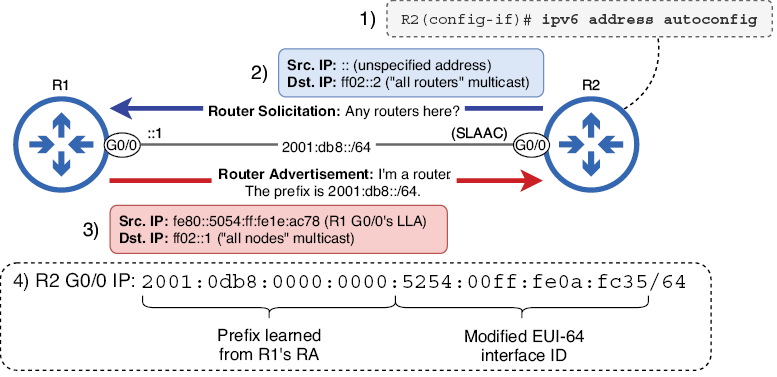
Follow the four-step diagram showing ipv6 address autoconfig, Router Solicitation, Router Advertisement, and prefix-plus-interface-ID address generation. section 21.1.3
