liveBook · Manning

Ipv6 address autoconfig

As explained in Acing the CCNA Exam: Volume 1 Fundamentals and Protocols

ipv6 address autoconfig default is a Cisco IOS interface command that autoconfigures an IPv6 address and installs a default route learned through router discovery.

IPv6 address autoconfig is a Cisco IOS interface command that uses NDP router discovery and SLAAC to learn an IPv6 prefix and generate an address. The router sends a Router Solicitation (RS); a neighboring router replies with a Router Advertisement (RA). Cisco IOS combines the learned prefix with a Modified EUI-64 interface identifier. section 21.1.3

Address and default-route learning

On R2, configuring ipv6 address autoconfig on an interface causes R2 to learn the 2001:db8::/64 prefix from R1's RA and generate its interface address. Using ipv6 address autoconfig default also installs a default route whose next hop is R1's link-local address. section 21.1.3

Figure 21.3 R2 uses SLAAC to generate an IPv6 address. (1) Issue the ipv6 address autoconfig command. (2) R2 sends an RS message. (3) R1 responds with an RA message. (4) R2 combines the learned prefix with a Modified EUI-64 interface ID to make its IPv6 address.
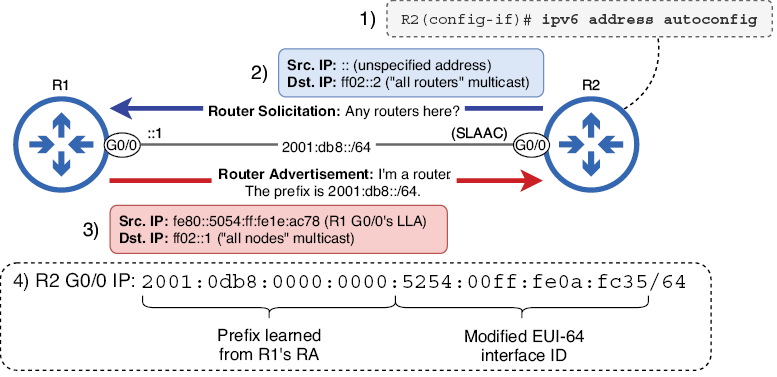
The sequence diagram shows the command, RS, RA, and Modified EUI-64 address-generation steps. section 21.1.3

How Acing the CCNA Exam: Volume 1 Fundamentals and Protocols covers it

How deep it goes
Explains RS and RA exchange, prefix learning, Modified EUI-64 generation, and optional default-route installation.
Examples
Uses an R2-R1 scenario in which R2 learns 2001:db8::/64 and optionally installs R1 as its default next hop.
What you can do after
Operate/configure it by applying either autoconfig command on a Cisco IOS interface for automatic addressing.
How it connects
Connects SLAAC with NDP, Router Solicitation, Router Advertisement, Modified EUI-64, and default routes.

Related concepts

This explainer was generated by Manning's knowledge graph from the text of Acing the CCNA Exam: Volume 1 Fundamentals and Protocols. The section links point to the parts of the book it draws on.