The Cisco IOS ipv6 unicast-routing command enables IPv6 unicast packet forwarding between router interfaces. Enter it in global configuration mode before configuring IPv6 routing; without it, interfaces can have IPv6 addresses but the router cannot forward packets between networks. section 20.4
Basic IPv6 router setup
On R1, enable forwarding before connecting networks such as 2001:db8::/64 and 2001:db8:0:1/64: R1(config)# ipv6 unicast-routing. Without this command, R1 cannot forward traffic between hosts on those networks. Remember that IPv4 routing is enabled by default, but IPv6 routing is not. section 20.4
Enabling the command supports the expected IPv6 routing behavior:
- Interfaces can be assigned IPv6 addresses with ipv6 address, including automatically generated host portions using Modified EUI-64. section 20.4 section 20.6
- The router can maintain connected routes for attached IPv6 networks and local /128 routes for its own interface addresses. section 21.2.1
- Verify related behavior with show ipv6 interface brief and show ipv6 route. section 20.4 section 21.2.1
Figure 20.4 A router with three connected IPv6 networks. ipv6 unicast-routing allows the router to forward IPv6 packets. ipv6 address configures an IPv6 address on each interface. Modified EUI-64 is used to automatically generate the host portion of G0/2’s IPv6 address.
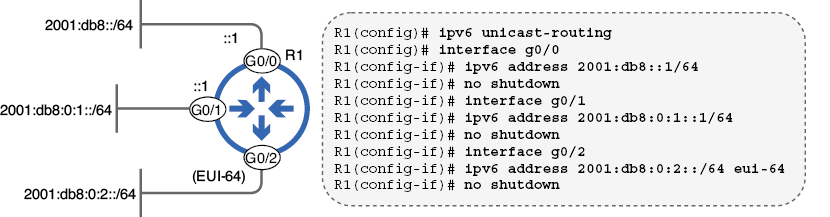
Use the router diagram to connect the global forwarding command with IPv6 addresses configured on multiple interfaces and networks. section 20.4
