A JSON Web Token (JWT) is a common format for bearer tokens used to access protected APIs. A client sends the token with a request; the API validates it before treating the request as authenticated. Unlike an authentication cookie used by a traditional web app, a bearer token can be used by anyone who possesses it. Protect it like a password, and do not put it in a URL query string where it might be logged. section 25.2 section 25.7
A JWT has three parts:
- A header and a payload. The payload carries claims, such as a subject or scope. JWT contents are readable by default; base64 encoding does not encrypt them. section 25.4.2 section 25.7
- A signature. Always verify it when receiving a JWT to check that the token has not been tampered with. If the contents need protection from readers, JWE can wrap and encrypt a JWT. section 25.7
Figure 25.7 An example JWT, decoded using the website https://jwt.io. The JWT consists of three parts: the header, the payload, and the signature. You must always verify the signature of any JWTs you receive.
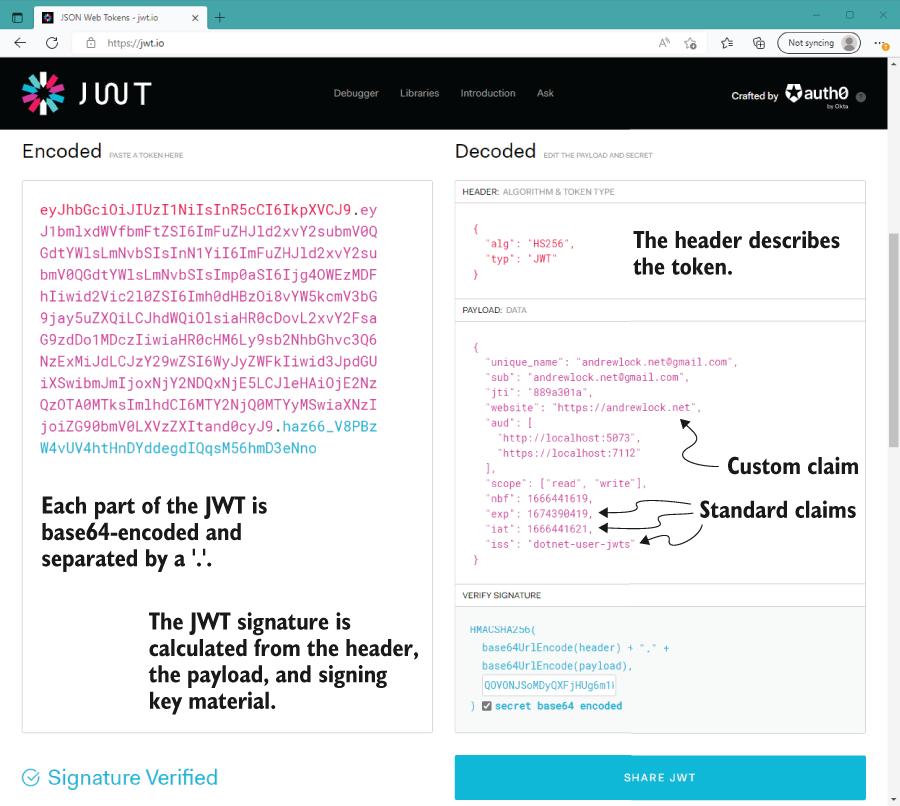
See how the header, payload, and signature appear in a decoded JWT. Decoding helps you inspect a token; it does not replace signature verification. section 25.2 section 25.7
In ASP.NET Core, JWT bearer authentication validates and deserializes a token, creates a ClaimsPrincipal, and sets HttpContext.User. Authorization can then decide whether the authenticated caller may use an endpoint. For a minimal API, install Microsoft.AspNetCore.Authentication.JwtBearer, register AddAuthentication().AddJwtBearer() and AddAuthorization(), and apply RequireAuthorization() to a protected endpoint. A request without a token receives a 401 Unauthorized challenge. section 25.3 section 25.7
Listing 25.1 Adding JWT bearer authentication to a minimal API application
WebApplicationBuilder builder = WebApplication.CreateBuilder(args);

builder.Services.AddAuthentication()         #1
    .AddJwtBearer();                         #2
builder.Services.AddAuthorization();         #3

builder.Services.AddScoped<RecipeService>();

WebApplication app = builder.Build();

app.UseAuthentication();                     #4
app.UseAuthorization();                      #5

app.MapGet("/recipe", async (RecipeService service) =>
{
    return await service.GetRecipes();
}).RequireAuthorization();                   #6

app.Run();
#1 Adds the core authentication services
#2 Adds and configures JWT authentication
#3 Adds the core authorization services
#4 Adds the authentication middleware
#5 Adds the authorization middleware
#6 Adds an authorization policy to the minimal API endpoint
Follow the minimal API setup from service registration through middleware to an endpoint protected by RequireAuthorization(). section 25.3
Try a protected API locally
From the project folder, run dotnet user-jwts create. The tool creates a token, stores signing material in User Secrets, and configures the development app to accept its tokens. Send the printed token in a request header exactly as Authorization: Bearer <token>. A misspelled header, missing space, or mistyped token can produce a 401 response. For a test that needs particular claims, use --claim <key>=<value>; --name changes the subject, and --scope adds a scope claim. These generated tokens are for local testing, not production: use a real identity provider to issue tokens for logged-in users in production. section 25.4.1 section 25.4.2 section 25.4.3










