A JSON Web Token (JWT) is a compact, non-opaque access-token format. It carries client or user claims so a resource server can authenticate the token and apply authorization without first requesting token details from the authorization server. section 13.2 section 13.2.2
Figure 13.8 The anatomy of a JWT token. The header and the body contain the details needed for the resource server to validate the token’s authenticity and apply the authorization constraints.
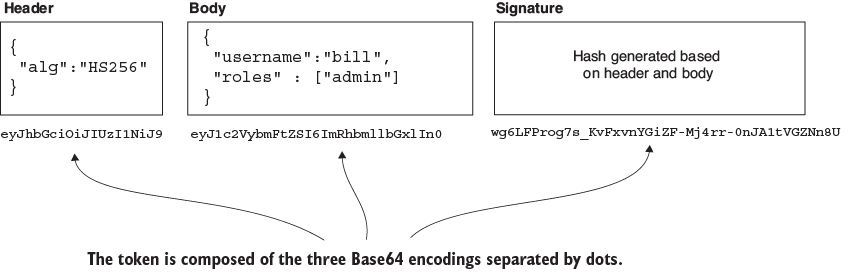
Use the token anatomy to distinguish the header, JSON body, and signature that make up a JWT. section 13.2.2
A JWT contains three dot-separated, Base64-encoded parts:
- Header — usually identifies the signing algorithm and the authorization server’s key ID. section 13.2.2
- Body — contains JSON claims about the client and user to whom the token was issued. section 13.2.2
- Signature — provides cryptographic evidence that the expected authorization server issued the token and that its header or body was not altered. section 13.2.2
The header and body are encoded for transfer, not hidden from whoever obtains the token. Keep the carried data limited, especially when it is large or sensitive; use an opaque token when those concerns require introspection instead. section 13.2.2
In an OAuth 2 system, the authorization server issues the JWT and the client presents it to a resource server. The resource server uses the claims to enforce access rules. section 13.6 section 13.1
Validate JWTs in a Spring resource server
Add the Spring Boot resource-server, security, and web dependencies; expose a test endpoint such as /demo; configure the authorization server’s public key set URI; then require authentication. A SecurityFilterChain can use oauth2ResourceServer(c -> c.jwt(j -> j.jwkSetUri(keySetUri))) and authorizeHttpRequests(c -> c.anyRequest().authenticated()). The resource server retrieves public keys from the authorization server and uses them to verify access-token signatures. section 15.1 section 15.5
Figure 15.2 The resource server retrieves a set of public keys from the authorization server through an endpoint made available by the authorization server. The resource server then uses these keys to verify the signature of the access token.
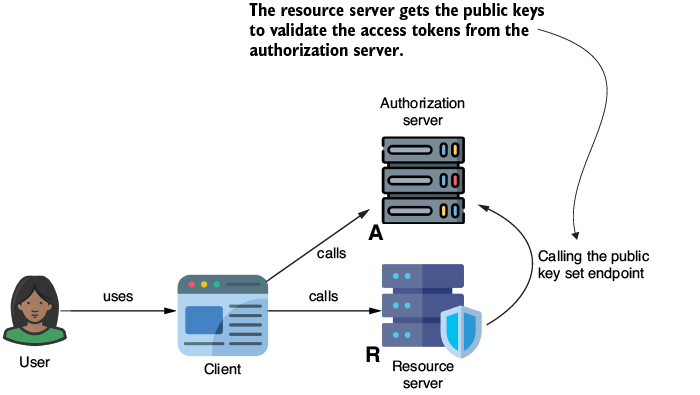
Follow the key-distribution flow: the resource server obtains public key material from the authorization server and verifies the token signature locally. section 15.1
Test the protected endpoint
Obtain an access token through an OAuth 2 grant, then call the resource server with an Authorization: Bearer token header, such as curl 'http://localhost:9090/demo' --header 'Authorization: Bearer eyJraW…'. A valid JWT allows the authenticated request to reach the endpoint. section 15.1
JWTs avoid the authorization server call required by opaque-token introspection. Choose introspection instead when early revocation is needed or when the token would carry too much or overly sensitive data. section 13.2.2 section 15.5










