Kestrel is the default cross-platform web server for ASP.NET Core. It receives HTTP requests from the network, turns them into an HttpContext that the application can use, and sends the application’s response back as HTTP. The application decides what the response contains; Kestrel handles the network-facing work. section 1.4.2 section 3.1
An ASP.NET Core application typically runs Kestrel inside its own process. After Kestrel creates an HttpContext, the request passes through the middleware pipeline toward an endpoint that generates a response. This self-hosting model differs from older ASP.NET hosting, which relied more tightly on IIS. section 2.4.2 section 3.1
A company information page
When a browser requests a company page, Kestrel receives the request and creates its HttpContext. The application can use the request details to generate the page, then return the response through Kestrel to the browser. Kestrel does not choose the page’s content. section 3.1 section 1.4.2
Two deployment choices affect what Kestrel receives:
- Expose Kestrel directly to the network. This is supported. section 2.4.2
- Place a reverse proxy, such as IIS or NGINX, in front of it. The proxy receives internet traffic and forwards requests to the application; this is the more common arrangement and can offer security and performance benefits. section 2.4.2 section 27.1
For HTTPS, a reverse proxy can handle TLS before forwarding traffic to the application. Alternatively, Kestrel can load a production certificate from the Kestrel:Certificates:Default configuration section when it starts, without an application code change. A development certificate is suitable for local testing, not production. section 28.5
Figure 27.1 The hosting model for ASP.NET Core gives flexibility. The same application can run exposed directly to the network, behind various reverse proxies without modification, and even inside the IIS process.
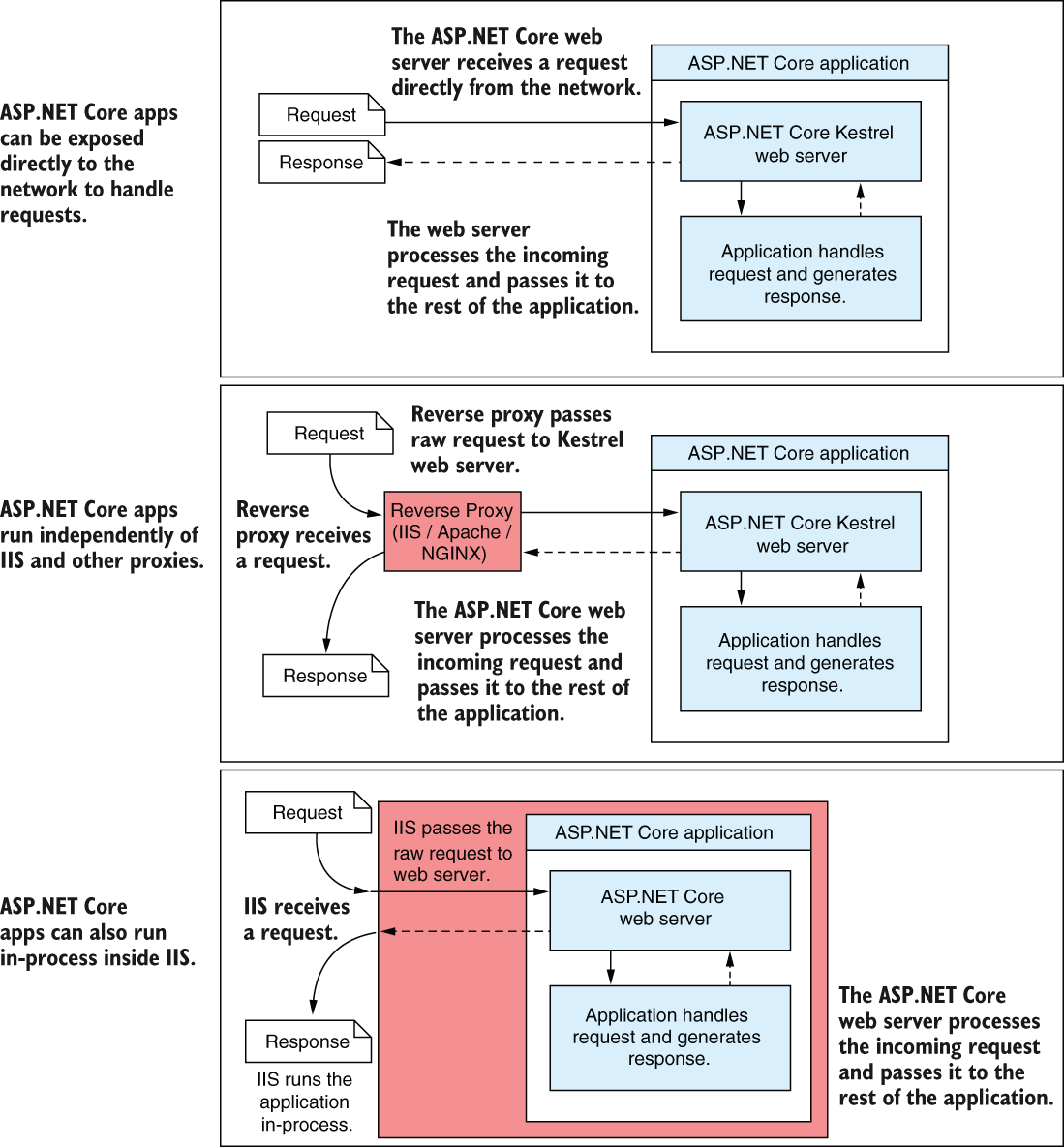
Compare direct exposure, reverse-proxy hosting, and hosting inside the IIS process without treating them as different application implementations. section 27.1

