Legacy code is older code that remains under maintenance but feels risky to change. It may be hard to read, test, or work with, and developers may not know what depends on it. The practical danger is not simply its age: changing unfamiliar code can leave the application in an unknown state of stability. section 1.8
The term has competing definitions. It can mean source no longer supported on standard hardware or environments, an older maintained version of an application, or—most usefully for testing work—code with no tests. “Code that works” captures the uncomfortable reality that functioning behavior alone does not make change safe. section 1.8
Legacy code commonly blocks test-driven development: existing components may lack seams, or places where collaborators can be extended or replaced. Teams can then struggle to write tests, refactor safely, choose a starting point, or overcome limited time, resistant designs, and inadequate tooling. section 12.0
Approach a large legacy system deliberately rather than trying to test everything at once:
- Map components by dependency count, amount of logic, and project priority. section 12.4
- Use logical or cyclomatic complexity to identify code with substantial branching, such as nested conditionals, switch cases, or recursion. section 12.4
- Start with easier components when the team is new to unit testing, building confidence through successive tests. section 12.4
- Tackle harder components earlier when the team is experienced and can use that work to speed progress across the system. section 12.4
Before a large refactoring, write integration tests that can remain mostly unchanged while the system is reshaped. Afterward, replace most of them with smaller unit tests that are easier to maintain. This creates a temporary safety net without treating integration tests as the final testing design. section 12.4
Figure 1.7 You can have many failure points in an integration test. All the units have to work together, and each could malfunction, making it harder to find the source of a bug.
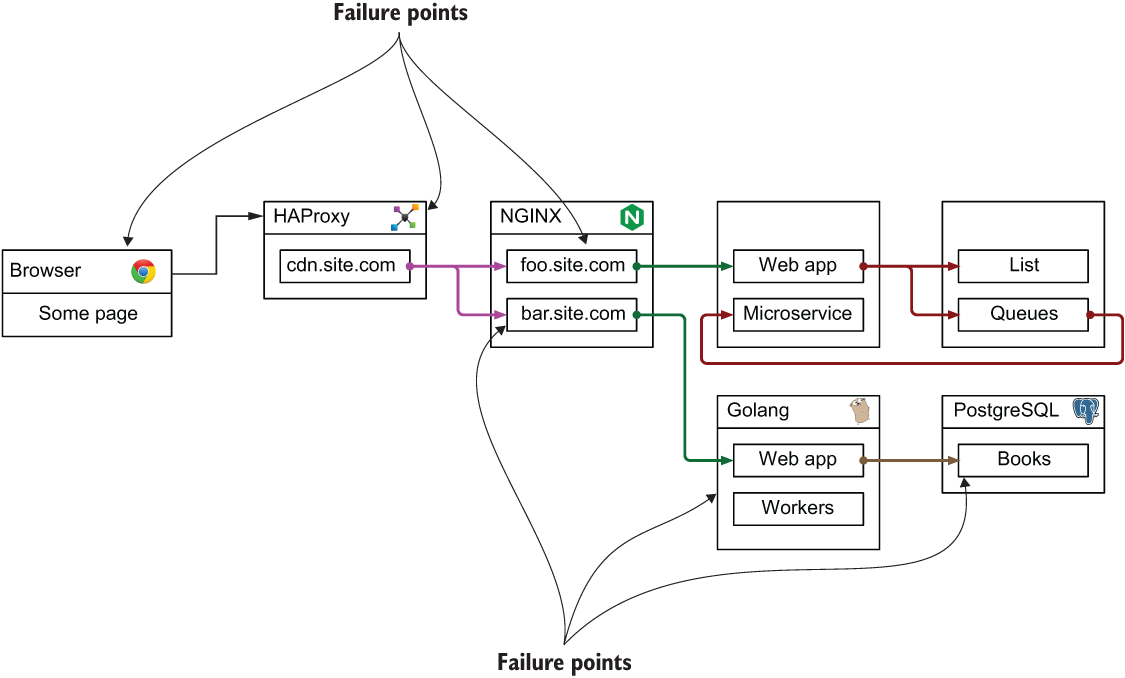
Use the failure-point diagram to remember why broad integration tests can protect a refactoring yet be harder to diagnose: every participating unit may be the source of a failure. section 1.8
The goal is not to label old code as hopeless. It is to reduce fear of changing it by adding runnable tests and choosing work according to risk, complexity, and team capability. Deeper seam-creation and refactoring techniques are a separate specialization. section 12.0 section 12.3.1
