Web page code is the set of instructions that turns a page idea into something a browser can display. HTML supplies the page’s structure and content, CSS controls its appearance, and JavaScript can add interactive behavior. On its own, code is just text; it becomes a web page when saved in a browser-accessible file and opened in a browser. section 1.2 section 1.4.3
You do not need to write every line yourself to use web page code. A detailed plain-English request can ask ChatGPT for a complete page, including its title, header, sections, links, images, footer, colors, fonts, and layout. More specific requirements generally produce code that more closely matches the intended page. section 1.2 section 4.0
A practical prompt-copy-save-deploy workflow is:
- Prompt ChatGPT for the page code and describe the required content and design. section 2.1
- Copy the generated code into a text editor and save the HTML as index.html. section 1.4.3
- When CSS is supplied separately, save it as styles.css in the same folder and ensure the HTML links to it. section 6.2.3
- Open the file in a browser to test it, then deploy the HTML file to a web host. section 1.4.6 section 2.1
A two-file page
A request can ask for HTML first and CSS second. The HTML file contains a link such as <link rel="stylesheet" type="text/css" href="styles.css">, which tells the browser where to find the formatting rules. Keeping both files together lets one CSS file style a page or multiple pages in the same site. section 6.2.3 section 7.3
Check the result rather than assuming generated code is perfect. If the page misses the goal, make the request more specific or ask for adjustments in the same chat session. For small changes, you can safely edit visible text, headings, or copied section blocks while leaving the surrounding HTML tags in place. section 1.4.6 section 6.4
Figure 1.6 The code copied from ChatGPT and saved to an HTML file
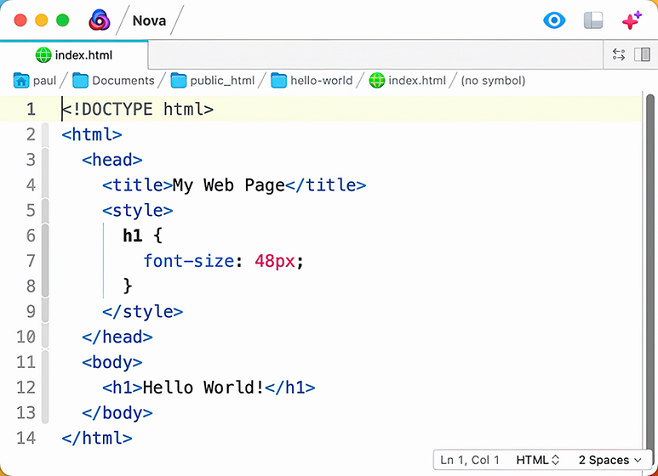
See the handoff from generated text to a saved HTML file: the small but essential step that makes code ready to open in a browser. section 1.4.3
