A license-included model bundles the SQL Server license cost into the cloud VM’s hourly rate, avoiding a separately supplied license. Using it requires a cloud provider’s SQL Server image. section 8.10
The convenient-image mistake
Creating an AWS EC2 or Azure VM from the provider’s SQL Server image seems efficient, but the default image may install every SQL Server feature and tool, including SSMS. Azure images may also configure trace flags 1117 and 1118. Treat the image as a licensing starting point, then remove unnecessary features, keep client tools off the server, and apply the desired configuration. section 8.10
Apply the model safely:
- Choose the provider image when the license-included hourly model is required. section 8.10
- Modify the image-based installation to match required features and configuration-management standards. section 8.10
Figure 8.4 Fresh EC2 instance with SQL Server AMI
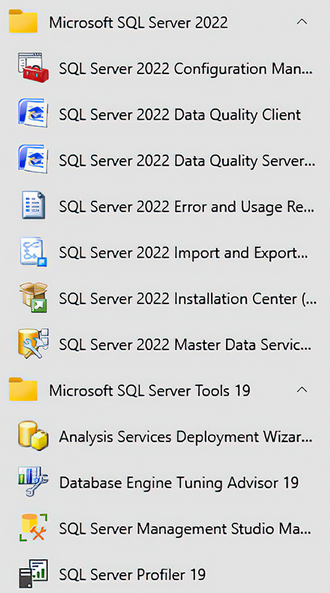
Inspect the fresh AWS SQL Server image to identify the default installation footprint. section 8.10
Figure 8.5 Freshly built Azure VM with SQL Server image
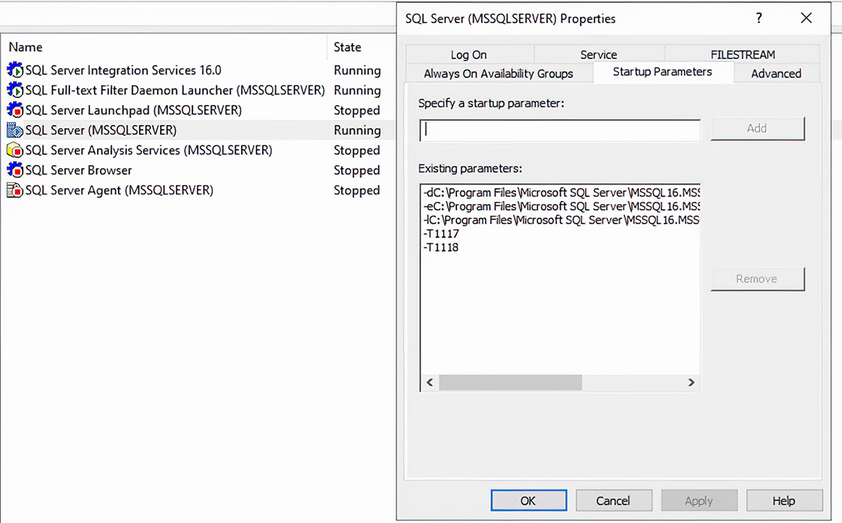
Inspect the fresh Azure image to identify installed services and configured startup trace flags. section 8.10
