liveBook · Manning

Line

As explained in D3.js in Action, Third Edition

An SVG line is a line element defined by two endpoint coordinates and rendered as a straight segment.

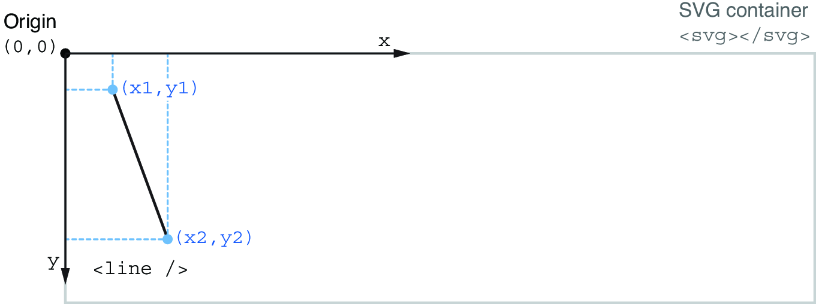
An SVG <line> draws one straight segment inside an SVG container. Set its two endpoints with x1, y1, x2, and y2; coordinates outside the container can leave part of the segment hidden. section 1.2.2

Draw and style a line

Place a line in an SVG, then add stroke to make it visible. stroke-width controls the thickness. <svg> <line x1="50" y1="45" x2="140" y2="225" stroke="black" stroke-width="3" /> </svg> section 1.2.2

Lines are one of the fundamental SVG shapes used when building D3 visualizations. Their position comes from the SVG coordinate system, while presentation attributes provide the visible result. section 1.2.2

Figure 1.12 Positioning a line element in the coordinate system of an SVG container
figure

Inspect the endpoint coordinates against the SVG coordinate system to see how they determine the segment’s placement. section 1.2.2


How D3.js in Action, Third Edition covers it

How deep it goes
Explains endpoint coordinates, stroke styling, and container clipping without deeper SVG rendering internals.
Examples
Builds a gallery line from (50,45) to (140,225), then styles it black with width 3.
What it assumes
Starts from an empty HTML body and introduces SVG basics needed to begin.
What you can do after
Build it from scratch with endpoint coordinates and visible stroke attributes inside an SVG container.
How it connects
Connects SVG lines to D3, the DOM, SVG coordinate systems, stroke, and stroke-width.

Also explained in

Compare how 2 books explain line →

Related concepts

This explainer was generated by Manning's knowledge graph from the text of D3.js in Action, Third Edition. The section links point to the parts of the book it draws on.