A page begins as a field of tiny possible marks: ink dots on paper or pixels on a screen. A line is a useful instruction for organizing those marks into an edge, a stroke, or part of a shape. Though mathematics often reserves “line” for something infinite, practical drawing usually means a line segment: a finite stretch between two endpoints. section 1.0 section 1.3
Two coordinate pairs can specify a line segment. The segment from (1, 1) to (6, 3), for instance, is unchanged if its endpoints are named in reverse order. Horizontal and vertical segments are straightforward: mark dots along a row or column. Thickness comes from marking neighboring rows or columns too. section 1.3
Turning a sloping line into pixels
A sloping line does not pass neatly through a grid of square pixels. One simple approximation chooses the pixel whose center lies closest to the intended line in each column. That works better for a shallow slope than choosing one pixel per row; for a slope steeper than 45°, reverse the choice and select one pixel in each row. At exactly 45°, either approach gives the same result. More, smaller pixels make the stepped result look more like a continuous line. section 1.3
Figure 1.6 A line defined by the coordinates of its two endpoints
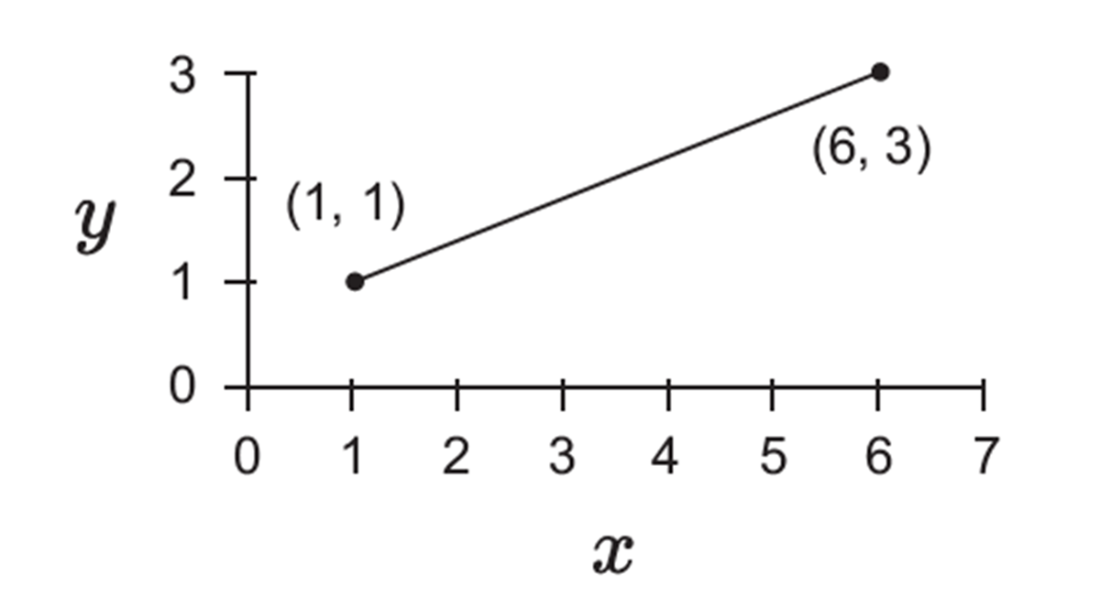
The endpoints make a line segment a compact geometric description before any pixels are chosen. section 1.3
The gap between a smooth geometric description and a pixel grid explains why diagonal edges can look jagged. Using shades of gray at the edge can make a raster line appear smoother: rather than treating every pixel as fully black or white, the drawing can use intermediate shades. This same conversion from vector descriptions to raster marks helps turn letter outlines and drawings into printable or displayable pages. section 1.3 section 1.6
Lines are also building blocks, not merely marks in their own right. Letter forms combine straight and curved parts; when rendered, curves themselves can be subdivided into many tiny straight lines. Straight pieces scale cleanly, but approximating a curve with too few of them spoils its shape, so more suitable curve sections are needed for complex forms. section 2.1 section 2.5
Draw with coordinates
On graph paper, connect a sequence of coordinate pairs with line segments. The resulting path can form a recognisable shape; a second exercise is to choose pixels on a 20 × 20 grid that best approximate supplied lines or characters. These small trials make the trade-off tangible: a geometric line is continuous, while its raster version is a deliberate selection of discrete marks. section 1.5 section 1.6
Once shapes become type, lines acquire another job: characters are selected and placed beside one another to form words and lines, using bounding boxes and related measurements. Thus a line can mean both a drawn stroke and an arrangement of text on a page. section 9.5


