liveBook · Manning

Line-height property

As explained in Design for Developers

Line height is the vertical distance allocated to each line of text, including the space between successive lines.

Line height sets the vertical space allocated to each line of text. It supports readable body copy and creates a consistent vertical rhythm across a page. section 8.2.5 section 8.3

Use line height as part of an intentional typography system:

  • Start with the body font size, then multiply it by a unitless line-height value to calculate the pixel line height. section 10.5
  • Use 1.5 for 16px body text as a practical accessibility baseline; larger headings can often use 1.2–1.4 to avoid excessive space. section 8.2.5
  • Align the resulting values with a baseline grid, adjusting margins and padding when a chosen line height does not land on the grid. section 8.2.5 section 10.5
  • Judge readability in context because line length and font family also affect how comfortable the text feels. section 8.3 section 10.5

A compact body-text setting

For 16px body copy, a line-height value of 1.25 produces 20px line height. If the page uses a 12px baseline, add 16px of top margin to a paragraph: 20px + 16px = 36px, a multiple of 12. section 10.5

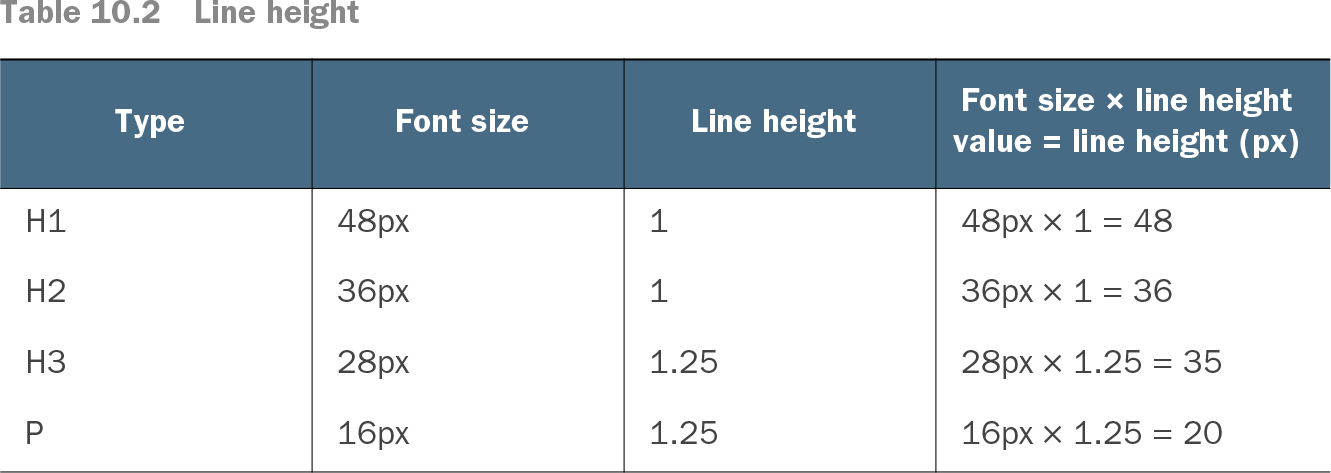
Table 10.2 Line height (view table figure)

Type

Font size

Line height

Font size × line height value = line height (px)

H1

48px

1

48px × 1 = 48

H2

36px

1

36px × 1 = 36

H3

28px

1.25

28px × 1.25 = 35

P

16px

1.25

16px × 1.25 = 20

Compare font sizes with their unitless line-height values and resulting pixel heights. section 10.5


How Design for Developers covers it

How deep it goes
Explains unitless calculations, baseline alignment, accessibility guidance, and margin adjustments, stopping short of browser rendering internals.
Examples
Uses 16px body text, 1.25 and 1.5 values, 20px and 24px results, 12px baselines, and heading type ramps.
What it assumes
Assumes basic font-size knowledge while teaching baseline grids, unitless calculations, and their relationship to spacing from first principles.
What you can do after
Apply it by selecting line-height values, calculating pixel results, and tuning margins and padding against a baseline grid.
How it connects
Connects line height to typography, vertical rhythm, baseline grids, readability, line length, margins, padding, and font size.

Also explained in

Compare how 8 books explain line-height property →

Related concepts

This explainer was generated by Manning's knowledge graph from the text of Design for Developers. The section links point to the parts of the book it draws on.