A curve whose values rise faster as x increases, modeled here with paired data points that follow y = 1.08^x. section 3.0 section 3.1
It is used as a training target for a GAN: the model learns to generate (x, y) samples that match the curve rather than just a formula. section 3.0 section 3.6
Core treatment steps use this shape as follows:
- Create a dataset of (x, y) pairs over a chosen x range. section 3.1
- Fill y from the exponential relation and batch the observations for training. section 3.2 section 3.2.1
- Plot the pairs to verify the curve before GAN training. section 3.2.1
Savings account with 8% annual growth
A $1 balance grows to 1.08 after one year and 1.08^2 after two years, giving the running example for the curve. section 3.0 section 3.1
Figure 3.1 The steps involved in training GANs to generate an exponential growth curve and the dual-network architecture in GANs. The generator obtains a random noise vector Z from the latent space (top left) to create a fake sample and presents it to the discriminator (middle). The discriminator classifies a sample as real (from the training set) or fake (created by the generator). The predictions are compared to the ground truth and both the discriminator and the generator learn from the predictions. After many iterations of training, the generator learns to create shapes that are indistinguishable from real samples.
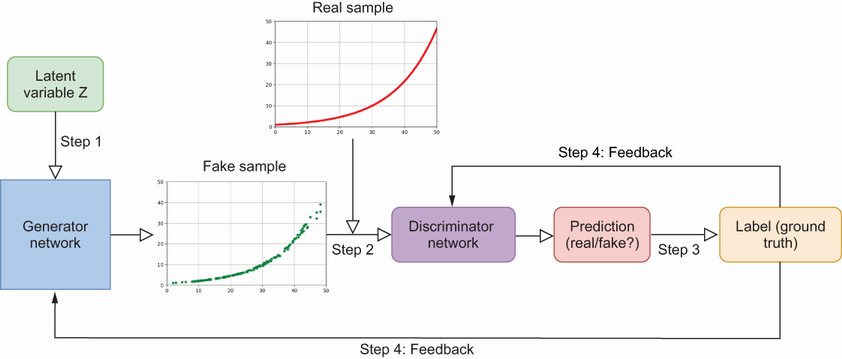
Shows the GAN loop that uses the curve data: generator makes fake samples, discriminator classifies them, and both update over many iterations. section 3.1
Listing 3.1 Creating training data to form an exponential growth shape
import torch

torch.manual_seed(0)                                #1

observations = 2048

train_data = torch.zeros((observations, 2))         #2

train_data[:,0]=50*torch.rand(observations)         #3

train_data[:,1]=1.08**train_data[:,0]               #4
Creates the training tensor directly with x values in one column and y = 1.08^x in the other. section 3.2.1
Listing 3.2 Visualizing the relation between x and y
import matplotlib.pyplot as plt

fig=plt.figure(dpi=100,figsize=(8,6))
plt.plot(train_data[:,0],train_data[:,1],".",c="r")    #1
plt.xlabel("values of x",fontsize=15)
plt.ylabel("values of $y=1.08^x$",fontsize=15)         #2
plt.title("An exponential growth shape",fontsize=20)   #3
plt.show()
Plots the generated points so the exponential growth shape is visible before model training. section 3.2.1
