Local mode is the standard operational mode for a lightweight access point (LWAP). It provides basic service sets (BSSs) for wireless clients and tunnels all client traffic to the wireless LAN controller (WLC) through the CAPWAP data tunnel. section 19.2.2 section 19.3
Use these facts to distinguish Local mode from other LWAP modes:
- Treat Local as the default LWAP operational mode. section 19.2.2 section 19.3
- Provide BSSs so clients can associate with wireless networks. section 19.2.2
- Send client traffic through the CAPWAP data tunnel to the WLC rather than switching it locally. section 19.2.2 section 19.3
- Contrast Local with FlexConnect, which can locally switch traffic between wired and wireless LANs and can be enabled per SSID. section 19.2.2 section 19.3
Operational trade-off
A client associated with an LWAP in Local mode sends its traffic through the WLC. This centralized path can be inefficient when the WLC and clients are not on the same LAN; FlexConnect avoids that path by locally switching eligible traffic. section 19.2.2 section 19.3
Figure 19.8 CAPWAP creates two tunnels between each LWAP and the WLC: a control tunnel and a data tunnel. The control tunnel uses UDP port 5246, and the data tunnel uses UDP port 5247.
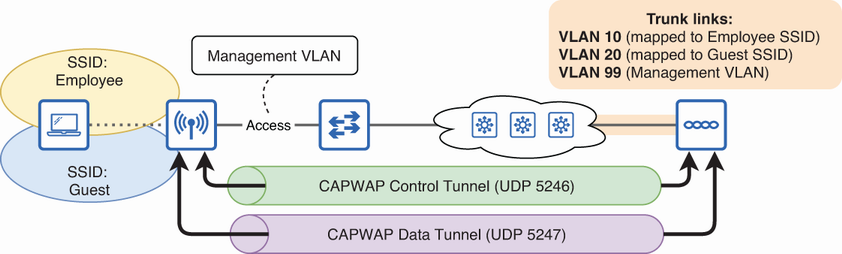
Review the CAPWAP control and data tunnels used between an LWAP and its WLC; Local mode relies on the data tunnel for client traffic. section 19.2.2
