FlexConnect is a lightweight access point (LWAP) operating mode for sites where tunneling every client frame to the WLC would add latency or consume WAN bandwidth. Instead, the LWAP locally switches selected client traffic between wireless SSIDs and the wired LAN. section 19.2.2 section 19.3
Configure and reason about FlexConnect using these operational facts:
- Enable FlexConnect per SSID or WLAN; one WLAN can use local switching while another continues using the standard Local mode. section 19.2.2 section 21.3.3
- Use a trunk connection from the LWAP to the wired LAN because FlexConnect must support multiple VLANs. section 19.2.2
- Contrast FlexConnect with Local mode: Local mode tunnels all client traffic to the WLC through the CAPWAP data tunnel, whereas FlexConnect can switch it locally. section 19.2.2 section 19.3
- Recognize FlexConnect Local Auth as a separate option that lets the LWAP authenticate clients without relying on the WLC. section 21.3.3 section 21.4
- Expect locally switched traffic for enabled SSIDs to continue operating when the LWAP loses its WLC connection. section 19.2.2
Guest local switching
Enable FlexConnect for a Guest WLAN so its client traffic switches locally between the Guest SSID and its wired VLAN, while the Employee WLAN remains in the default Local mode and tunnels traffic to the WLC. section 19.2.2
Figure 19.10 With FlexConnect enabled, a LWAP can locally switch traffic between SSIDs and VLANs. FlexConnect can be enabled per SSID.
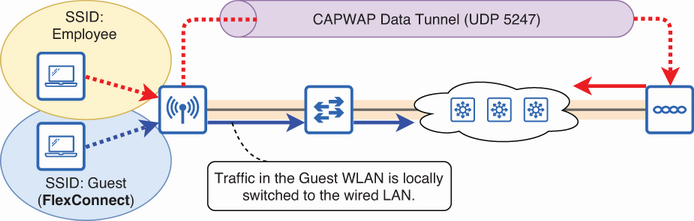
Use the figure to visualize how FlexConnect maps locally switched SSIDs to wired VLANs and compare that path with controller tunneling. section 19.2.2
