The Log Analytics agent (LA agent), previously called the Microsoft Monitoring Agent, collects data from virtual machines and sends it to a Log Analytics workspace. Microsoft Defender for Cloud uses that data for IaaS VM weakness and misconfiguration detection, unlike PaaS resources, which use a backend integration. section 6.2.1
For Defender for Cloud, the agent is the generally available integration path described here. Azure Monitor Agent (AMA) is its evolution, but AMA integration with Defender for Cloud may be in public preview. Defender for Cloud can create default workspaces by VM region after subscription onboarding. section 6.2.1 section 9.1.4
Deploy the agent and related VM protections through auto-provisioning:
- In the Defender for Cloud portal, open Environment Settings and select the onboarded subscription. section 7.2.1
- Open Settings & Monitoring, enable Log Analytics Agent/Azure Monitor Agent, select Continue, and save the setting. section 7.2.1
- Enable Vulnerability Assessment alongside the agent when configuring Defender for Servers plan 2. section 7.2.1
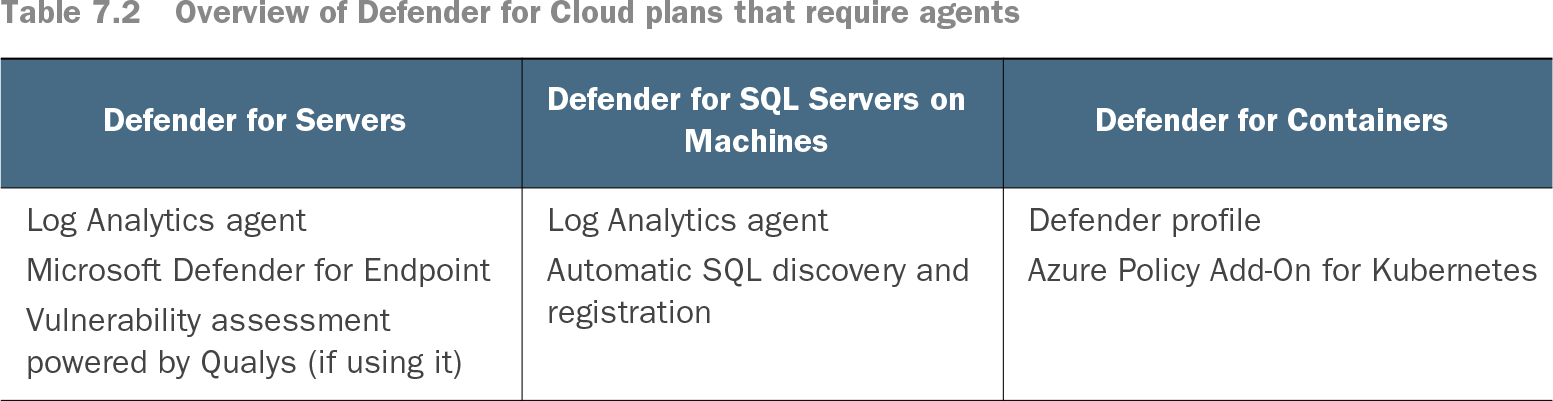
Several Defender for Servers capabilities rely on the agent, including Microsoft Defender for Endpoint integration, file integrity monitoring, and adaptive application control. Auto-provisioning can also deploy agents and extensions required by other Defender for Cloud plans. section 7.2.1
Table 7.2 Overview of Defender for Cloud plans that require agents (view table figure)
Compare Defender for Cloud plans that require the Log Analytics agent with plans that require other agents or extensions. section 7.2.1