Automated provisioning deploys required security agents and extensions automatically across resources. In Microsoft Defender for Cloud, it keeps virtual machines connected to security monitoring as they are created and can extend required tooling to existing machines. This reduces the risk that a newly deployed workload is left outside the security posture. section 6.2.1 section 7.2.1
For VM monitoring, the Log Analytics agent collects security-related configuration data and event logs, including operating-system logs, running processes, IP addresses, and logged-in users. It sends that data to a Log Analytics workspace, where Defender for Cloud uses it for analysis. Auto-provisioning ensures machines in an onboarded subscription send data to the selected workspace. section 6.2.1
Configure agent deployment for Defender for Servers in the Azure portal:
- Select Continue, then Save. Repeat the process for other plans that require agents or extensions. section 7.2.1
The enabled plan determines what must be provisioned. Defender for Servers capabilities such as Microsoft Defender for Endpoint integration, file integrity monitoring, and adaptive application control rely on the Log Analytics agent. Other plans may require different components: Defender for SQL Servers on Machines uses the Log Analytics agent and automatic SQL discovery and registration, while Defender for Containers uses the Defender profile and Azure Policy Add-On for Kubernetes. section 7.2.1
Kubernetes worker-node protection
For an Azure Kubernetes Service cluster, auto-provisioning can deploy the native Kubernetes Defender profile to every worker node. The profile collects node signals for Defender for Cloud analysis, supporting detection of suspicious activity and signs of compromise, such as crypto-mining on nodes. Control-plane threat detection separately uses Kubernetes audit logs and API-server security events. section 7.2.2
A custom Log Analytics workspace can be used instead of the default workspace when centralized management or organizational naming is needed. The custom workspace must have the SecurityCenterFree solution enabled; agents can then be connected manually or through the recommended auto-provisioning approach. A custom workspace is also required when sharing a workspace with Microsoft Sentinel. section 6.2.1
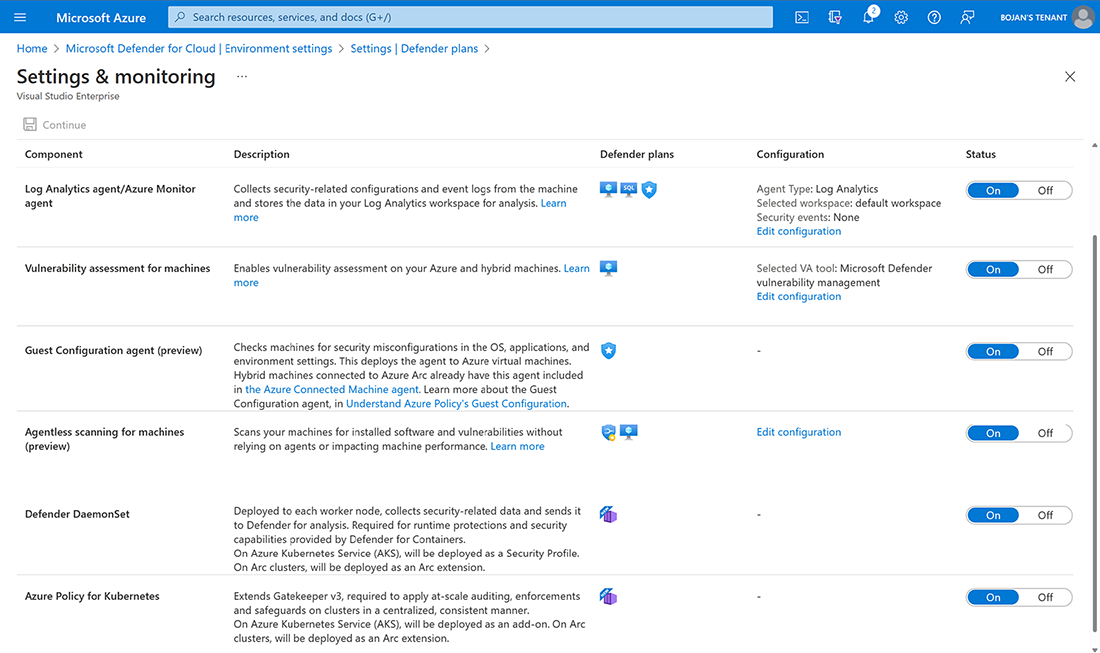
Use the configuration view to locate the auto-provisioning controls for the Defender profile and Azure Policy for Kubernetes. section 7.2.1
