A Log4j XML configuration tells the application which messages to write, where to send them, and how to format them. Store log4j2.xml on the Maven project's class path, typically in its resources folder. section 4.2.2
Configure three connected components:
- Logger: selects messages, such as all application messages through the Root logger, and applies a severity threshold. section 4.2.2
- Appender: determines the destination, such as the system terminal, a file, or a database. section 4.2.2
- Formatter: shapes each message, for example by adding a timestamp, thread, logger name, and severity. section 4.2.2
Console logging with severity control
A Root logger at level info sends messages to a Console appender. Its PatternLayout prints timestamps and severity levels. Changing the Root level to debug also exposes detailed messages such as each parsed character, which can help investigate execution without permanently increasing routine log volume. section 4.2.2
Figure 4.13 The relationship between the appender, logger, and formatter. A logger uses one or more appenders. The logger decides what to write (e.g., only log messages printed by objects in the package). The logger gives the messages to be written to one or more appenders. Each appender then implements a certain way to store the messages. The appender uses formatters to shape the messages before storing them.
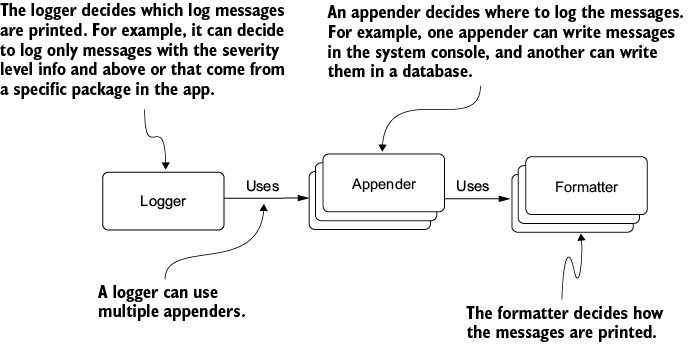
Trace how the logger selects messages, passes them to appenders, and lets formatters shape the stored output. section 4.2.2
