Hexadecimal color notation gives CSS a compact way to describe a color’s red, green, and blue components. Each RGB hex triplet starts with #, then uses two hexadecimal digits for red, green, and blue. Values run from 00 to ff—computer-friendly numbers that look a little mysterious until you split them into three tiny color dials. section 17.5
Read the notation piece by piece:
- #rrggbb assigns two digits to red, two to green, and two to blue. section 17.5
- Use #rrggbbaa when an alpha pair is needed to control transparency; 00 is completely transparent and ff is completely opaque. section 17.5
- Shorten a code when each pair repeats its character: #3366cc becomes #36c. section 17.5
Purple heading
The decimal value 128 corresponds to hexadecimal 80, so equal red and blue components create purple while green stays at 00: h1 { color: #800080; } <h1>Royalty: A History</h1> For a friendlier route, the Web Design Playground’s Color Chooser can select a color and display its CSS codes. section 17.5
Figure 17.9 You can specify a color by using the code #rrggbb, where rr is the hex value for the red component, gg is the hex value for the green component, and bb is the hex value for the blue component.
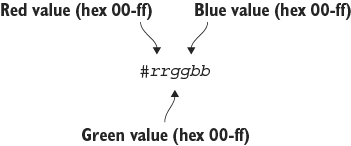
Use the component diagram to see how #rrggbb divides into red, green, and blue hexadecimal pairs. section 17.5



