Magic link authentication lets a user sign in without a memorized password: the application sends a unique, short-lived login link to the user’s email address, then creates a session after validating the link. section 14.0 section 14.1
A secure login flow follows these steps:
- Accept the user’s email address and return a generic response such as “If an account exists, we’ve sent a login link,” without revealing whether the address is registered. section 14.1 section 14.3
- Generate a unique, cryptographically signed token containing an expiration time and a nonce, and attach it to the login link. section 14.1
- Send the link by email, validate the token and its expiration when clicked, then establish a secure session. section 14.1
Reduce the main failure modes by:
- Making tokens expire quickly, storing them in a database or cache, and invalidating them after use to limit replay and support revocation. section 14.3
- Using recognizable emails, avoiding plaintext links, and limiting link requests to reduce phishing, exposure, and automated abuse. section 14.3
A passwordless login
Alice enters her email address on ACME’s login page. An email arrives with a button to log in. After she clicks it, the application validates the short-lived token and admits her without asking for a password. section 14.1
Figure 14.1 Authenticating through magic links. At the user’s request, the app generates a unique link and sends it to the user by email. The user clicks the link to authenticate.
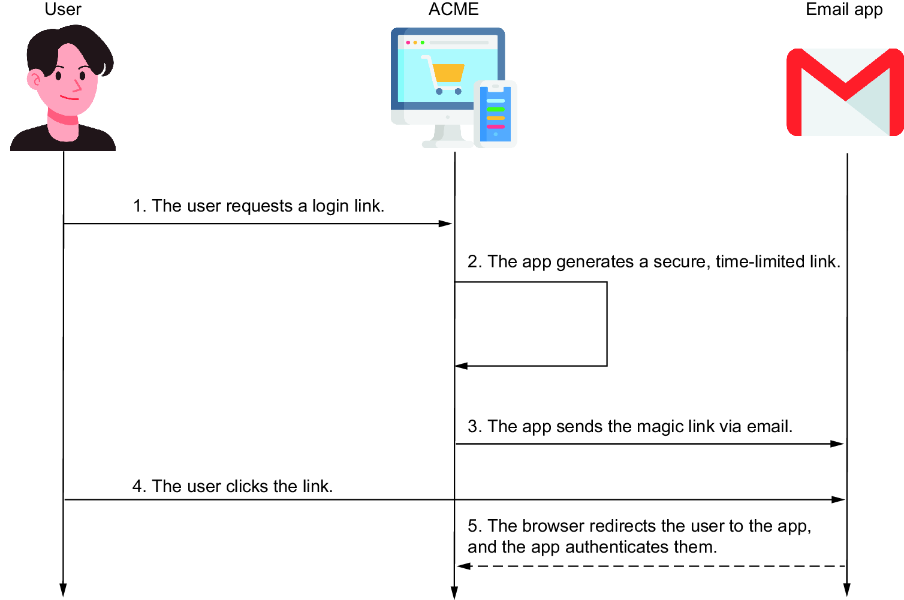
Trace the complete magic-link authentication sequence from the user’s request through email delivery and link-based authentication. section 14.1
