Passwordless authentication verifies identity without requiring a conventional password. It reduces forgotten-password resets, reused credentials, credential leaks, and login friction, but every alternative still depends on careful security design. section 14.0 section 14.4
The approach replaces something the user knows—a password—with something the user receives, possesses, or is: an email link, temporary code, biometric, or hardware security key. section 14.4 section 15.0
Common passwordless mechanisms include:
- Magic links send a unique link to the user’s email. The server validates its signature, expiration, and—when stored—whether it has already been used, then creates a session or issues a fresh authentication token. section 14.1
- One-time passwords provide temporary numeric codes through SMS, email, or authenticator applications. App-based OTPs are preferred in the guidance, while request limits reduce brute-force and flooding risks. section 14.4
- WebAuthn uses public-key cryptography with biometrics, platform authenticators, or FIDO2-compatible security keys. Authentication is tied to a device and domain rather than a reusable password. section 15.0 section 15.5
A safer magic-link flow
A user requests a login link, receives a short-lived signed token, and clicks it. The application checks the token’s signature and expiration, confirms that it has not been used, invalidates it after successful use, and establishes a session. Storing tokens in a database or cache supports revocation and replay prevention. Clear identity in the email, request throttling, and avoiding plaintext token exposure reduce phishing and interception risks. section 14.1
A WebAuthn registration and authentication flow
A browser checks for PublicKeyCredential support, requests a credential with a server challenge, and sends the resulting credential data to the backend. The server stores registration details and the public key. During login, it creates and stores a fresh challenge, receives the authenticator response, retrieves the registered key, verifies the signature against the original challenge, and authenticates only on success. Production implementations should use a known library rather than handwritten signature verification. section 15.3
Figure 14.1 Authenticating through magic links. At the user’s request, the app generates a unique link and sends it to the user by email. The user clicks the link to authenticate.
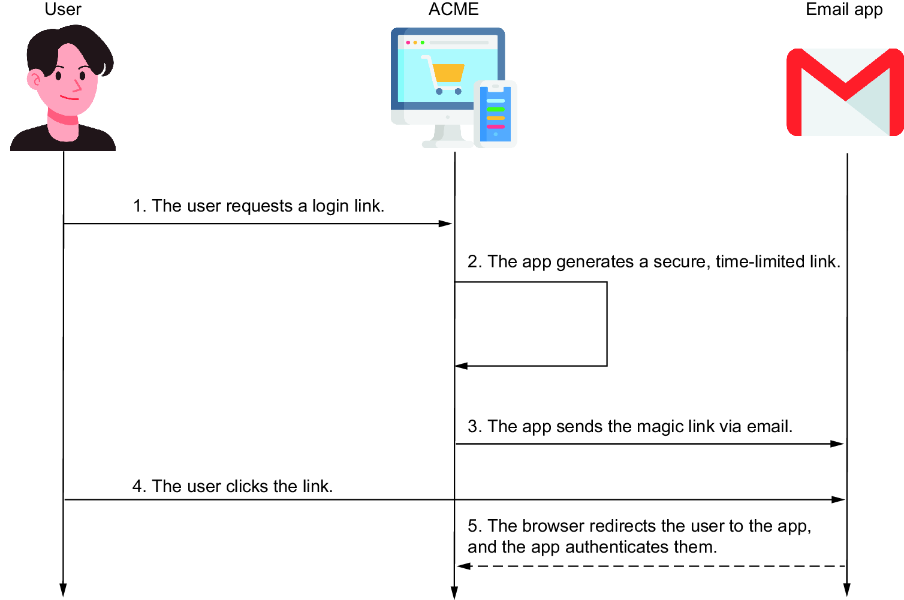
Shows the magic-link sequence from the user’s request through email delivery and link selection. section 14.1
