The main axis is the primary direction in which a flex container places and distributes its flex items. In a normal row, it runs from main start on the left to main end on the right; the cross axis runs perpendicular to it. section 4.1
Figure 4.1 A flexbox container and its elements
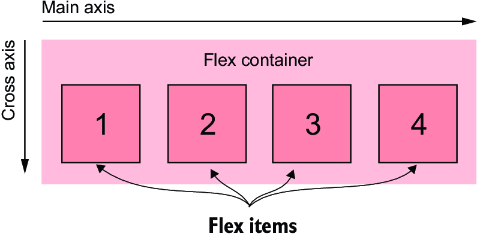
Use the diagram to distinguish the flex container, flex items, main axis, cross axis, and their start and end points. section 4.1
The main axis determines how several flexbox rules affect a layout:
- Changing flex-direction changes the main-axis direction. A column or column-reverse layout rotates it so items flow vertically from top to bottom or in reverse. section 4.3.1
- flex-basis, flex-grow, and flex-shrink apply along the main axis. In a row they affect width; in a column they affect height. section 4.3.1
- justify-content distributes unused space along the main axis, using values such as flex-start, flex-end, center, space-between, space-around, and space-evenly. section 4.4.1
- flex-wrap creates additional lines along the main-axis flow; in a constrained column, wrapped items can overflow into a new column. section 4.4.1
A vertical nested flexbox
A sidebar can become a column flex container with flex-direction: column. Its main axis then runs vertically, so assigning flex: 1 to its tiles lets their heights stretch and align the tile bottoms when the outer layout provides a constrained height. section 4.3.1
A vertical flex container still grows naturally to fit its contents. Therefore, flex-grow and flex-shrink affect item heights only when another rule or container supplies a specific height. section 4.3.1


