ManyToManyField defines a relationship where each object can connect to several objects of another model. In RiffMates, a band can include multiple musicians, and a musician can belong to multiple bands. section 4.7 section 4.7.2
Unlike ordinary model fields, it does not add a column to the model’s table. Django creates a separate relationship table containing keys for both related objects and a unique relationship identifier. section 4.7.2
A practical Django workflow looks like this:
- Declare the field on either participating model: musicians = models.ManyToManyField(Musician). section 4.7.2
- Create and apply migrations so Django creates the model and relationship structures. section 4.7.2
- Create objects, then connect them with the relationship manager’s add() method. section 4.7.2
- Read connections with all(); Django provides the reverse relationship through band_set when no custom name is specified. section 4.7.2
Connecting musicians to bands
>>> beatles = Band.objects.create(name="The Beatles") >>> lennon = Musician.objects.get(last_name="Lennon") >>> beatles.musicians.add(lennon) >>> beatles.musicians.all() <QuerySet [<Musician: Musician(id=2, last_name=Lennon)>]> >>> lennon.band_set.all() <QuerySet [<Band: Band(id=1, name=The Beatles)>]> section 4.7.2
Figure 4.10 Database tables for many-to-many relationship between bands and musicians
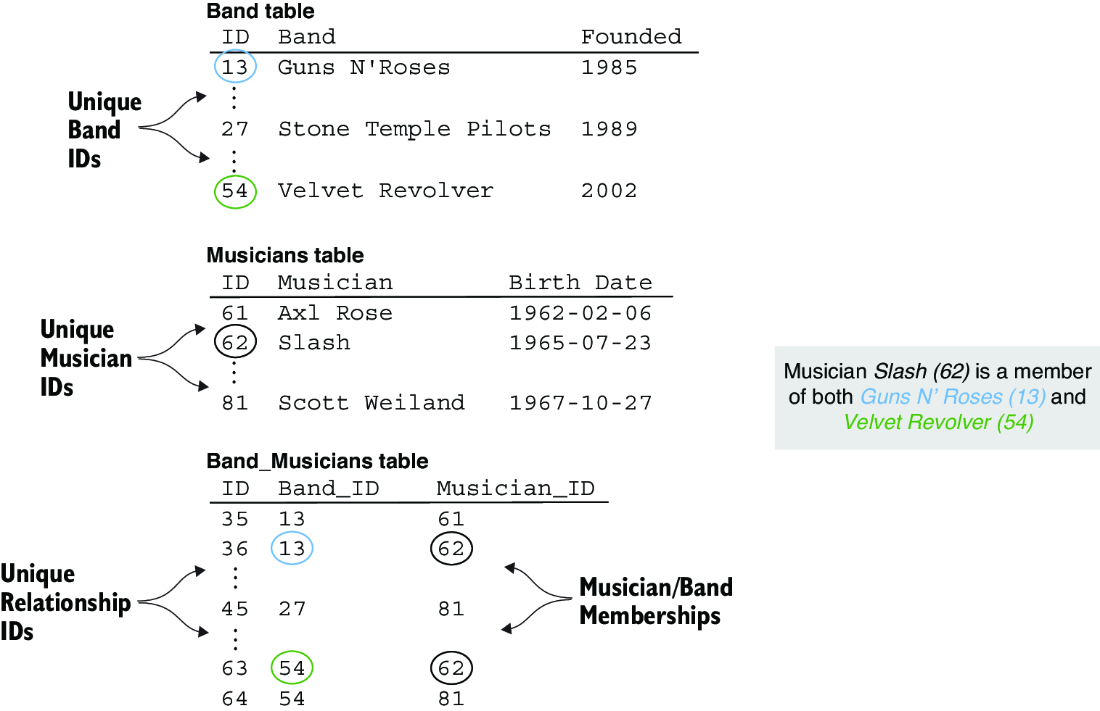
Compare the separate bands, musicians, and relationship tables that represent many-to-many membership. section 4.7.2
