A user clicks while a mousemove handler is still running. The click does not interrupt it: the browser keeps the pending event in a queue until JavaScript can handle it. This lets a single thread respond to events that arrive faster than their handlers finish—but a slow handler can make the page feel unresponsive. section 2.3.1 section 2.3.3
The basic event-handling cycle is:
- The browser detects an event and queues it. Detection and queueing happen outside the thread running the handler. section 2.3.1
- The event loop takes the event at the front and runs its associated handler, if one exists. Other events wait until that handler finishes. section 2.3.1 section 2.3.3
- If the queue is empty, the loop waits for more work. Keep handlers short enough that queued input does not leave users waiting. section 2.3.1
A mousemove followed by a click
Suppose a mousemove and then a click are queued. The mousemove handler runs first and adds a message to the DOM. The click waits; only after the mousemove handler returns does its handler run and add another message. Both actions are registered, but neither handler cuts in on the other. section 2.3.3
That single event queue is a useful starting picture, not the whole browser model. The event loop uses at least a macrotask queue and a microtask queue. Input and timer events are examples of macrotask work; promise callbacks are microtasks. After a task completes, queued microtasks run before the next macrotask, so an older waiting click need not run before a promise callback. A page may be re-rendered between macrotasks, but not before those microtasks run. section 13.1 section 13.1.2
Figure 13.6. If a microtask is queued in the microtask queue, it gets priority and is processed even if an older task is already waiting in the queue. In this case, the promise success microtask gets priority over the secondButton click event task.
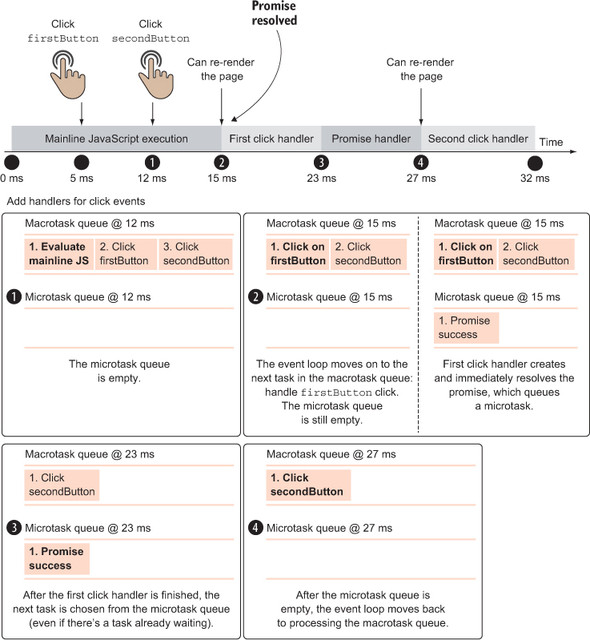
The timing diagram shows why arrival order across the two queues is not enough to predict execution order: the promise microtask runs before an already-waiting click task. section 13.1.2
Timer delays deserve the same caution. When a timeout expires or an interval fires, its task joins the queue; it cannot interrupt running JavaScript. If an interval already has a task waiting, another firing does not add a duplicate task. section 13.2.1
