A quick user moves the mouse, then clicks before your mousemove handler finishes. The click does not interrupt the handler; it waits. In the browser’s single-threaded execution model, only one piece of JavaScript code runs at a time. A long-running handler can therefore make an application feel unresponsive. section 2.3.1 section 2.3.3
The browser places detected events in an event queue. The event loop takes an event from the front and runs its handler, if it has one. Other events remain queued until that handler completes. User events such as clicks and server-generated events such as Ajax events enter the same queue. section 2.3.1
A mousemove followed by a click
The mousemove handler runs first and appends “Event: mousemove” to a DOM list. Only after it finishes does the click handler run and append its own item. The two handlers do not run simultaneously—even if the user acts faster than either handler completes. section 2.3.3
Timers have the same practical constraint. A 10 ms timeout makes its task eligible for the queue after the delay; it does not promise that the handler starts at 10 ms. Other code and queued tasks can keep it waiting. Keep handlers short, and distinguish a timer’s requested delay from its actual execution time. section 2.3.1 section 13.2.1
Figure 2.8. In the event-handling phase, all events (whether coming from the user, such as mouse clicks and key presses, or coming from the server, such as Ajax events) are queued up as they occur and are processed as the single thread of execution allows.
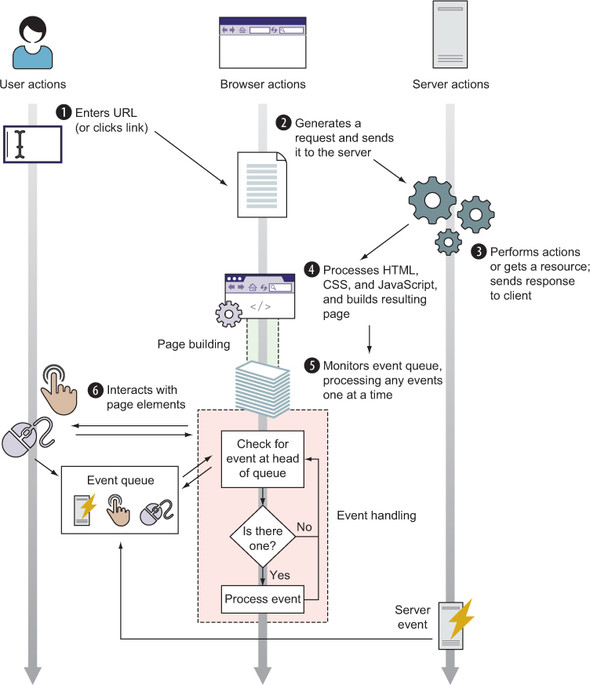
Follow user and server events into the queue, then trace how the single execution thread handles them one at a time. section 2.3.1
