The CSS margin property controls the whitespace outside an element’s border. Think of it as breathing room between neighboring elements or between an element and the browser window. Positive values push elements apart; negative values pull them closer and can create overlap. section 9.5
Margin is one part of the CSS box model: content sits inside padding, padding sits inside the border, and margin surrounds the border. Unlike padding, margin changes the space between boxes rather than the space inside one. section 9.1
Apply margin to individual sides or all sides at once:
- Use margin-top, margin-right, margin-bottom, and margin-left when each side needs its own value. section 9.5
- Use the shorthand margin property when one declaration can describe the four sides. section 9.5 section 9.7
- Choose standard CSS units such as px, em, rem, vw, vh, percentages, or auto. section 9.5
- Set a paragraph’s bottom margin to 1em as a general starting point for text spacing. section 9.5
A pull quote with custom margins
.pullquote { margin: 1.5em 2.5em 2em 3em; } The four values apply clockwise: top, right, bottom, and left. This gives the pull quote different breathing room on every side. section 9.5
Figure 9.1 The main parts of an element box
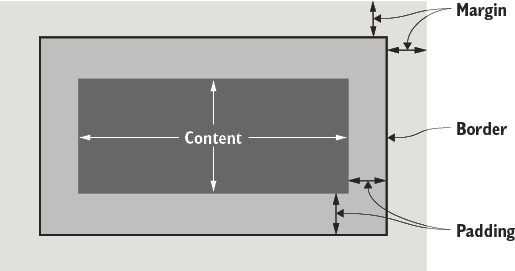
Use the element-box diagram to see margin as the outermost layer surrounding the border. section 9.1
Browsers apply default margins through their internal style sheet, so a reset can remove those defaults when precise control is needed. Responsive layouts commonly express margins with percentages or rem units rather than fixed pixels. section 9.5 section 14.12




